
Online booking integration means your scheduler, calendar, website, Google profile and follow-up all run off one set of availability rules. A customer picks a time, it lands on your calendar, they get a confirmation, and nobody has to type anything twice. Getting there is easy to start and easy to get wrong: double bookings, dead-end forms and leads that never get a text back are all integration problems, not software problems. That's why we build and wire up the whole chain for owner-led businesses instead of handing over a login and a tutorial. Here's how it works and what to check.
TL;DR
- Pick one booking destination and point everything at it: website, Google Business Profile, texts, emails. One calendar, one set of rules.
- Link out, embed, or plug in: all three work. Match the method to how much control and tracking you need.
- Double bookings come from two calendars that don't talk to each other. Fix the sync before you launch, not after.
- Clinics: a booking form can collect protected health information. Confirm the vendor will sign a business associate agreement (BAA) before you switch it on.
- Measure completed appointments, not button clicks.
Table of Contents
- What online booking integration actually does
- Three ways to put a scheduler on your website
- Set up the scheduler so it matches how you really work
- Avoiding double bookings across channels
- Connect booking to your Google Business Profile
- Clinics: keep online booking HIPAA-safe
- Measure what matters: completed appointments
- Our take on online booking integration
- Want it wired up for you?
- FAQ
- Sources
What online booking integration actually does
A booking tool on its own is a calendar page. Integration is what makes it part of the business. In practice that means four connections:
- Website to scheduler. The visitor books without leaving your site, or lands on a page that is clearly yours.
- Scheduler to calendar. Every booking blocks time on the calendar you actually live in, and every personal appointment you add there blocks online slots.
- Scheduler to messaging. Confirmations and reminders go out automatically by email or text.
- Scheduler to lead follow-up. A new booking, or an abandoned one, triggers the next step: a thank-you, a reminder, a nudge to someone who looked and didn't finish.
Skip any one and the gap shows up as a missed call, a no-show or an hour spent untangling a double booking. The embedded scheduler (the widget that sits on your page) is only the visible part.
Three ways to put a scheduler on your website
There's no single right answer. Here's the tradeoff for each.
| Method | How it works | Good for | Watch out for |
|---|---|---|---|
| Booking link | A button sends people to a hosted booking page | Fastest launch, social bios, email signatures | Visitors leave your site; the page looks like the vendor's, not yours |
| Embed (iframe or script) | The scheduler shows inside one of your pages | Keeping people on your site, a branded look | Mobile sizing, page-speed hit, extra scripts on the page |
| Plugin or native module | A booking add-on inside your website platform | Sites that already run on that platform | Updates and conflicts with other plugins |
For most service businesses we'd start with a dedicated booking page and embed the scheduler there. Then every button on the site, every ad and every profile points at that one page. You change the page once and the change applies everywhere.
A few embed details that save headaches:
- Put the scheduler on its own page, not squeezed into a crowded homepage.
- Test on a phone first. Most bookings start there, and a cut-off widget loses people quietly.
- Add a plain fallback link under the embed, in case a script is blocked.
- Keep the form short. Name, phone, email and service type is usually enough to book.
Set up the scheduler so it matches how you really work
The embed code takes five minutes. The configuration is where the work is.
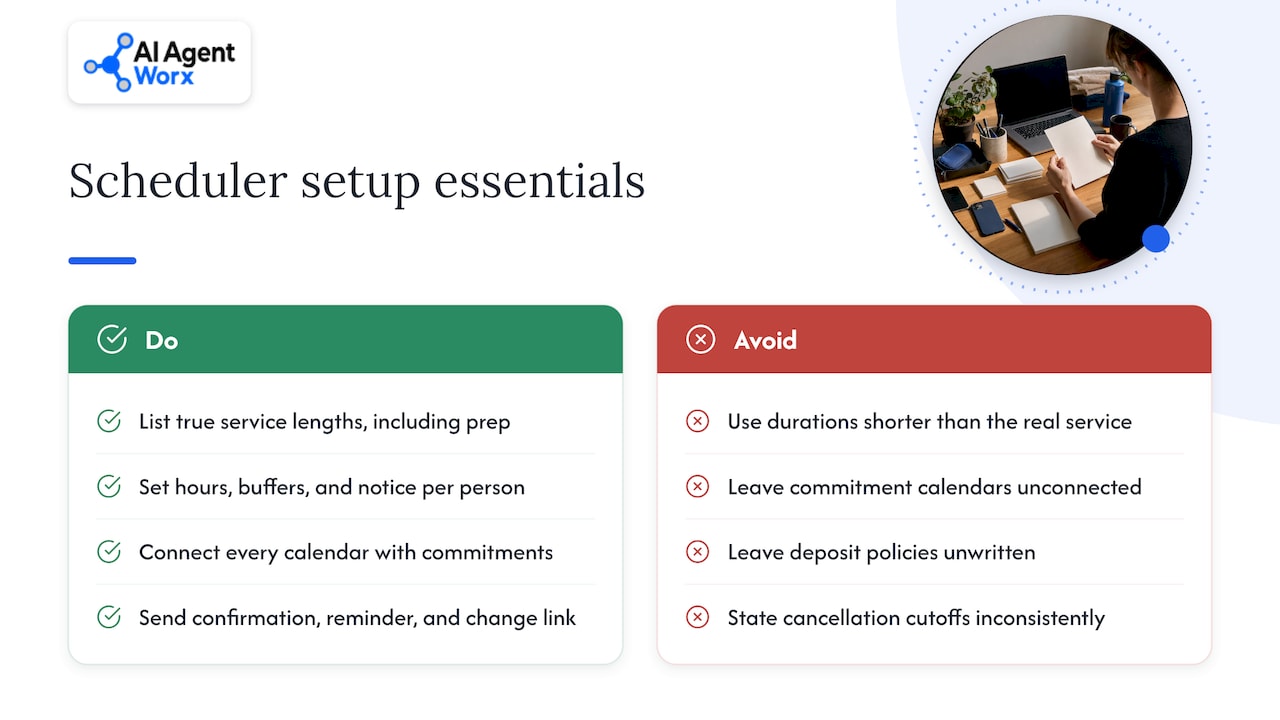
Services and durations. List each service with its true length, including cleanup or prep. A 30-minute service that really takes 45 stacks up into a late afternoon.
Staff and availability. Set hours per person, not just per business. Add buffers between appointments and a minimum notice window, so nobody books a slot ten minutes from now when you're out.
Calendars. Connect every calendar that holds real commitments. If your team uses a work calendar and a personal one, connect both for conflict checking. This is the number one cause of double bookings.
Confirmations and reminders. Send a confirmation immediately and at least one reminder before the visit. Include a reschedule or cancel link so a change doesn't become a no-show. We cover reminder timing in more depth in our guide to SMS appointment reminders for small businesses.
Payments or deposits. If no-shows hurt, a deposit at booking changes behavior. Keep the policy written out on the booking page so nobody is surprised.
Cancellation rules. Decide the cutoff (say, 24 hours) and state it once, in the confirmation as well as on the page.
Avoiding double bookings across channels
Double bookings happen when two systems each think they own the calendar. A phone call gets written on paper, a website visitor takes the same slot, and now you have two people at 2 p.m.
The fix is simple to say and takes discipline to do: every channel writes to one calendar. That includes:
- The website scheduler
- Your Google Business Profile booking button
- Phone calls and voicemails
- Walk-ins and staff entries
- Social profile links
Phone is the leak most owners miss. If calls get answered by a person who then has to open the calendar, or go unanswered while you're with a client, bookings split off the main system. This is the reason our AI phone receptionist and our appointment scheduling and customer follow-up work are built to run alongside each other: the call and the web booking both end up on the same calendar.
Connect booking to your Google Business Profile
For local businesses, a lot of first contact happens on Google Maps and search, before anyone reaches your site. Your profile can carry a booking button two ways. According to a Google Business Profile community guide, you can either connect a Reserve with Google partner for an automatic booking button, or paste your own booking URL. Which one is open to you depends on whether your scheduler is a supported provider.
Whichever you choose, point it at the same booking page your website uses. This walkthrough on appointment links on Google Business Profile covers the setup step by step. If you want the rest of the profile tightened up at the same time, see our Google Business Profile optimization page.
Clinics: keep online booking HIPAA-safe
This section is for dental, medical and men's health practices in the U.S. If you're not a healthcare provider, skip to the next one.
The core rule: when a vendor stores or handles patient information on your behalf, it is usually a business associate under HIPAA. HHS says that when a covered entity engages a cloud service provider to create, receive, maintain or transmit electronic protected health information, the provider is a business associate. A business associate needs a signed BAA with you. A scheduler that holds patient names, dates of birth, insurance details or reasons for visiting falls squarely into that.
Practical checks before you enable an embedded scheduler:
- Decide what the form asks. Name, phone, and appointment type and time are what a booking needs. Symptoms, insurance numbers and clinical history belong in a secure intake step after the booking.
- Confirm the BAA covers your actual plan. Some vendors sign a BAA only on a higher tier. Get it in writing for the plan you're on, not the one on the pricing page.
- Keep reminders neutral. "You have an appointment Tuesday at 3:00" is enough. Leave out the procedure, diagnosis or visit reason.
- Watch tracking scripts. Ad pixels and analytics tags on booking pages can send visitor data to third parties. Keep the booking page clean and review what loads on it.
- Limit access. Only staff who need schedule details should see them, and calendar entries should carry minimal clinical detail.
Your compliance officer or healthcare attorney makes the final call on your setup. We'll build the booking flow around the decisions they give you.
Measure what matters: completed appointments
Booking software dashboards love to show page views. You care about three numbers:
- Completed appointments, not just bookings made.
- Speed of response to new leads: how long between a form fill or call and the first reply.
- No-show rate, before and after reminders and deposits.
Set up tracking so a booking button click and a finished booking are counted separately. A thank-you page that only appears after a booking is confirmed gives you a clean event to count. Compare four to six weeks before and after the change, and don't change five things at once, or you won't know what worked.
Also watch where bookings come from: website, Google profile, phone, text. If one channel produces bookings that don't show up, that's where the integration is leaking.
Our take on online booking integration
Most owners we talk to don't have a booking problem. They have a handoff problem. The website takes a booking, the phone takes another, a lead fills a form and waits two days for a reply. Each tool works. Together they don't.
That's why we don't sell advice here. We build the system: the scheduler, the calendar sync, the reminders and the follow-up, shaped around the bottlenecks of an owner-led business. Then we keep supporting it, because a booking flow isn't a one-time install.
If you run a clinic or a service business and you're still answering calls between appointments, start with one booking destination and one calendar. Everything else gets easier from there.
Brian
Want it wired up for you?
If you'd rather not spend your evenings testing embeds and calendar syncs, that's what we do. AI Agent Worx builds done-for-you scheduling and follow-up systems for small and medium businesses, including clinics, with hands-on implementation and ongoing support.

See how appointment scheduling and customer follow-up works, or browse all our services.
FAQ
What's the difference between linking to a booking page and embedding a scheduler?
A link sends the visitor to a page hosted by the scheduling tool. An embed displays that same scheduler inside your own page. Embedding keeps people on your site and looks more branded, while a link is the quickest to set up.
How do I stop double bookings?
Connect every calendar you use to the scheduler, and make every channel write to that one calendar, including phone bookings. Add buffers and minimum notice, then test a few overlapping bookings before launch.
Does a clinic need a BAA for an online scheduler?
If the scheduler handles protected health information for your practice, HHS treats the vendor as a business associate, which calls for a signed agreement. Confirm it covers your specific plan and ask your compliance officer or healthcare attorney to review the setup.
Can customers book from Google Maps and my website at once?
Yes. Add a booking link or a supported booking provider to your Google Business Profile, and point it at the same scheduler your website uses so both channels share one calendar and one set of rules.
Sources
- Guidance on HIPAA & Cloud Computing (HHS)
- How to Add, Remove & Edit Booking Links on Google Business Profile (Google Business Profile Community)
- Appointment Links on Google Business Profile: Setup Guide