
Workflow automation connects a trigger (a new form, a paid invoice, a missed call) to an action that a computer takes for you, no human clicking required. The highest-payback pilots almost always sit in four spots: invoice processing, employee onboarding, lead routing and follow-up, and appointment reminders. Run one of those first. You'll see fewer errors and hours back in your week within the first month.
TL;DR:
- Automation of high-volume, rule-based tasks like invoice capture, onboarding, and lead routing delivers the quickest return on investment.
- Pilot programs should focus on simple, high-impact workflows such as invoice processing or appointment reminders before expanding to broader department use.
- Ensuring data quality and ownership is crucial, as system integration issues and unmonitored automations are common pitfalls that hinder scaling.
- Successful implementation requires mapping current workflows, setting clear acceptance criteria, and closely monitoring exceptions during early testing phases.
- When expanding automation across multiple teams, validate system capacity, adjust thresholds, and establish governance to manage increased complexity and error risk.
Table of Contents
- What Workflow Automation Examples Actually Solve
- HR Automation Examples That Cut Onboarding Time
- Finance and Accounting Automation Examples With Fast Payback
- Sales and CRM Automation Examples That Kill Lead Latency
- Marketing Automation Examples That Keep Campaigns Running
- IT and Operations Automation Examples That Cut Response Time
- Implementation Checklist: How to Pilot and Scale Automations Safely
- Scalability Considerations When Expanding Workflow Automations
- Integration Challenges and Solutions With Existing Systems
- Lessons From Implementing Workflow Automations for SMBs
- Get Your Automations Built, Not Just Recommended
- Sources
- FAQ
What Workflow Automation Examples Actually Solve
Here's the pitch in plain terms: automation saves time, cuts mistakes, and makes sure the same process runs the same way every single time, whether it's your best employee or your newest hire handling it. That consistency is the real prize. A human doing the same task 50 times a week will eventually skip a step. Software won't.
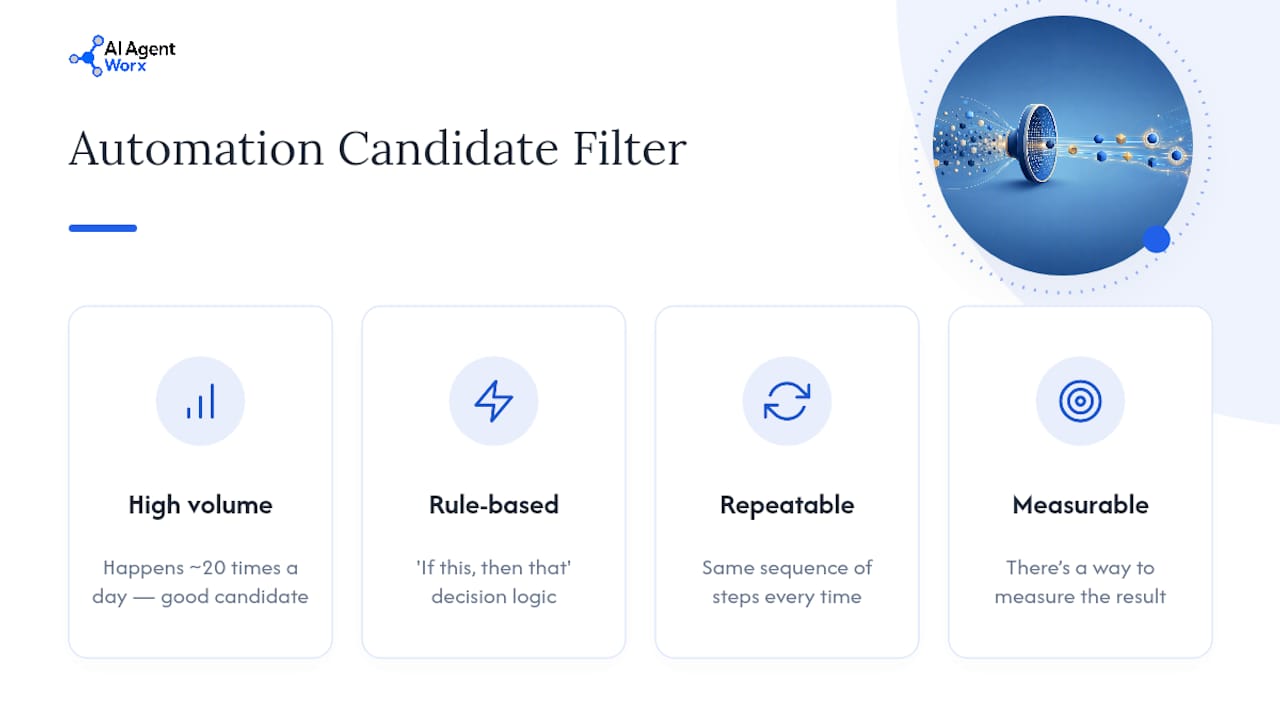
Not every task deserves automation, though. The best candidates share four traits: high volume, rule-based decisions, repeatable steps, and a way to measure the result. If a task happens 20 times a day and follows an "if this, then that" logic, it's a great candidate. If it requires judgment calls every time, it's not, at least not yet.
The examples below are grouped by department, HR, finance, sales, marketing, and IT, because that's how most practical automation guides organize the work, and it's how you'll actually assign ownership once you start piloting.
HR Automation Examples That Cut Onboarding Time
New hire onboarding is the classic starter automation, and for good reason. A new employee fills out one form, and the workflow fires off a chain of actions: account creation, system access, training module assignment, and a welcome email, all without HR touching a keyboard after the initial trigger.
Other HR workflows worth piloting:
- Time-off requests: An employee submits a form, it routes to their manager for approval, and once approved it syncs automatically to the shared calendar and payroll system.
- Expense reimbursement: A photo of a receipt gets uploaded, the system checks it against policy limits, routes it for approval if it passes, and queues payment.
- Offboarding: When someone leaves, the workflow revokes system access, triggers an asset return checklist, and sends an exit survey, all on a set schedule instead of whenever someone remembers.
- Benefits enrollment reminders: Automated nudges go out during open enrollment windows based on where each employee is in the process.
Pro Tip: Offboarding automation matters more than most managers think. A departing employee with lingering system access is a security risk you don't need, and manual offboarding is exactly the kind of task that gets forgotten during a busy week.
Track these with KPIs that actually mean something: time-to-productivity for new hires, approval cycle time for time-off and expense requests, and error or rework rates on onboarding paperwork. If those numbers don't move after 60 days, the workflow needs a redesign, not more patience.
Finance and Accounting Automation Examples With Fast Payback
Finance is where automation usually pays for itself fastest, because the tasks are numerical, rule-based, and prone to human error at scale.
Invoice capture is the flagship example. An invoice arrives, gets scanned, auto-validated against a purchase order, and routed to the right approver based on dollar thresholds. No manual data entry, no misplaced paper, no chasing down the person who has to sign off.
Other finance workflows to consider:
- PO approvals with matching: Purchase orders route automatically based on spending thresholds, with three-way matching against invoices and receipts to catch discrepancies.
- Expense reconciliation: Exception alerts flag anything outside policy before it hits the books, instead of during a quarterly audit.
- Scheduled reconciliation reports: Bank and ledger reconciliation runs on a set cadence with automatic flagging of mismatches.
- Recurring billing: Subscription or retainer invoices generate and send themselves on schedule.
Aggregated industry data shows small businesses running targeted automations report both high adoption and fast payback, with some implementations returning ROI in the hundreds of percent when the automation targets a genuinely high-volume process. Finance and scheduling tend to be where that payback shows up quickest, ahead of marketing and CRM, simply because the volume of repetitive numeric work is higher.
The metrics that matter here: days sales outstanding (DSO) reduction, hours saved per week on manual entry, and the error reduction rate on invoice matching. Watch DSO closely. It's the number that tells you whether faster processing is actually turning into faster cash.
Sales and CRM Automation Examples That Kill Lead Latency
The gap between a lead filling out a form and a rep calling them back is where deals die. Every hour of delay costs you conversion odds, and manual lead routing is usually where that delay comes from.
CRM workflow automation fixes this by handling the handoff instantly. A new lead submits a form, the system enriches their data (company size, industry, source), and routes it to the right rep based on territory or deal size, no manager triaging an inbox required.
Concrete CRM automation examples worth piloting:
- Immediate follow-up sequences: Hot leads (high intent, big deal size) trigger an instant email or text, not a "we'll get back to you within 24 hours" holding pattern.
- Stalled-deal alerts: If a deal sits in the same stage for more than a set number of days, the workflow auto-creates a task and reminder for the rep.
- Post-sale handoff: When a deal closes, the workflow automatically notifies onboarding or customer success and creates their first-touch task.
- Lead scoring updates: As leads engage with content or emails, their score updates and syncs back to the CRM in real time.
These are the same categories that show up consistently across practical automation examples aimed at sales teams, because lead response time is one of the most measurable, most fixable bottlenecks in a sales process.
Track lead response time first. Then watch conversion rate and pipeline velocity, the speed at which deals move from one stage to the next. A tool like CRM automation can handle the routing and follow-up sequencing so reps spend their time closing instead of triaging.
Marketing Automation Examples That Keep Campaigns Running
Marketing automation examples usually fall into one of four buckets: nurture, publishing, ad management, and lead scoring. Each one removes a repetitive task that would otherwise eat a marketer's week.
Triggered welcome and nurture email flows are the most common starting point. A new subscriber gets a sequence of emails spaced over days or weeks, adjusted based on what they click, with zero manual sending involved.
Other marketing workflows worth building:
- Content publishing: A finished blog post triggers automatic CMS publishing and cross-posting to social channels on a set schedule.
- Ad performance rules: Underperforming ad sets get paused automatically, and high performers get more budget, based on rules you set once.
- Lead scoring syncs: As prospects engage with campaigns, their score updates and pushes to sales automatically, so no lead sits unnoticed.
- Event and webinar follow-up: Attendees get a tailored follow-up sequence, and no-shows get a different one, both triggered by the same event.
The metrics to watch are engagement-to-conversion rate and campaign throughput, how many campaigns your team can actually run in a month once the repetitive parts are off their plate. That second number tends to surprise managers the most. Teams rarely realize how much of their marketing capacity was going toward manual scheduling instead of strategy.
IT and Operations Automation Examples That Cut Response Time
IT and operations automation tends to get less attention than sales or marketing examples, but it's often where the most hours get recovered, because the tasks are so mechanical to begin with.
Incident routing is the clearest case. A monitoring tool flags a system issue, a ticket gets created automatically, and it routes to the right team based on severity, no one manually watching a dashboard for problems.
Other IT and operations workflows worth automating:
- Account provisioning: New employee accounts and system access get created automatically the moment HR onboarding kicks off, and deprovisioned the moment offboarding starts.
- Scheduled health checks: Backup jobs and system checks run automatically on a set cadence, with alerts only when something fails.
- Inventory threshold alerts: When stock drops below a set level, the workflow triggers a reorder request without waiting for someone to notice the shelf is empty.
- Automated compliance logging: System changes and access events get logged automatically for audit purposes instead of reconstructed after the fact.
The KPIs here are mean time to resolution (MTTR), provisioning lead time (how long a new hire waits for system access), and the percentage of alerts triaged automatically without human intervention. If MTTR isn't dropping after a few months of automated ticket routing, the routing rules probably need tightening, not the automation itself.
Implementation Checklist: How to Pilot and Scale Automations Safely
Running a successful pilot isn't complicated, but skipping steps is exactly how automations fail. Follow this order:
- Map the current workflow and assign an owner. Write down every step exactly as it happens today, including the messy parts. Someone needs to own the process, not just the tool.
- Pick a high-impact, low-complexity pilot. Invoice processing, appointment reminders, and lead routing are common starting points because they're high-volume and rule-based, which makes them easy to measure and low-risk to test.
- Define acceptance criteria before you launch. Decide what "working" looks like in numbers, not vibes, before the pilot goes live.
- Run the pilot and monitor exceptions closely. Watch failure rates and edge cases for the first two to four weeks. That's where you'll find the gaps in your original mapping.
- Iterate, document, and set up governance. Once it works, write down how it works, then schedule periodic audits so the automation doesn't quietly break six months from now.
Pro Tip: The single biggest mistake managers make is automating a broken process. If your invoice approval chain is already a mess of exceptions and workarounds, automating it just makes the mess move faster. Fix the process first, then automate it.
Two other anti-patterns show up constantly: poor data quality (garbage in, garbage automated) and zero monitoring after launch. An automation with no one watching its exception rate is a liability, not a time saver.
Scalability Considerations When Expanding Workflow Automations
A pilot that works for one team doesn't automatically work at ten times the volume. Before rolling an automation company-wide, check whether the underlying systems can handle the increased load, whether the approval thresholds still make sense at higher dollar amounts, and whether the same rules apply cleanly across different departments or regions.
Scaling also multiplies small errors. At 5,000, it's a real backlog. Build in periodic sampling checks as volume grows, not just at launch.
Ownership becomes trickier at scale too. One workflow owner can watch a single pilot closely. Ten workflows across five departments need a lighter, more structured governance model, regular audits, clear escalation paths, and someone accountable for the whole automation portfolio, not just individual pieces.
Finally, budget for the fact that scaling usually means integrating with more systems, not fewer. A workflow that connects two tools in a pilot might need to connect six once it's rolled out across the business. Plan the technical lift accordingly, and don't assume the pilot's simplicity will hold once volume and complexity both increase.
Integration Challenges and Solutions With Existing Systems
The most common reason automations stall isn't the automation logic itself. It's getting old systems to talk to new ones. Legacy software with no modern API, inconsistent data formats between tools, and duplicate records across platforms all create friction that shows up months after a pilot looked successful.
The fix starts with an honest audit of what your current systems can actually connect to. Some older platforms need a middleware layer or a dedicated integration tool to bridge the gap; trying to force a direct connection where none exists usually creates more manual workarounds than it removes.
Data quality is the second major integration issue. If your CRM and your accounting software both track customer names but spell them differently or store them in different formats, any automation pulling from both will hit constant mismatches. Standardizing data fields before you connect systems saves far more time than fixing mismatches after the fact.
Ownership matters here too. Integration problems tend to fall into a gap between IT and the department that requested the automation, with each side assuming the other is handling it. Naming one person responsible for the connection, not just the workflow, prevents that gap from turning into months of unresolved tickets.
Lessons From Implementing Workflow Automations for SMBs
The pattern that shows up again and again: the businesses that succeed pilot small, measure fast, and keep a human in the loop wherever a customer touches the process directly. Full automation on a customer-facing step, before you've proven the logic works, is how you turn a minor glitch into a public complaint.
The biggest source of friction isn't the software. It's messy data and unclear ownership. Half the "automation failures" I've seen trace back to a form that collects inconsistent data or a workflow nobody was actually accountable for once it launched.
Done-for-you implementation solves a real problem here: most owner-led businesses don't have a spare person to map processes, test edge cases, and monitor exception rates for a month. Hands-on setup, someone building and tuning the thing rather than just recommending it, is usually the difference between a pilot that gets adopted and one that quietly dies after week three.
— Brian
Get Your Automations Built, Not Just Recommended
Most consultants will hand you a workflow diagram and a list of tools to figure out yourself. Some providers build automation tailored to how your business actually runs, not a generic template stretched to fit.

If invoice processing, lead routing, or appointment reminders sound like the pilots your business needs, that's exactly the kind of project Workflow and Business Process Automation handles start to finish. Need the customer-facing side covered too? Appointment Scheduling and Customer Follow-Up and CRM, Messaging, and Nurture Automation plug into the same systems so leads and bookings never sit untouched. Every build comes with ongoing support, not a handoff document you're left to implement alone. Check out the full service lineup and book a discovery call to map out which automation should go first.
Sources
- 15 Workflow Automation Examples That Actually Save Time - TechnologyAdvice
- Small Biz Automation 2026: 82% Use It, 248% | Stealth Agents
- Workflow Automation Mistakes: Common Challenges & Fixes - Kloudify
- Workflow automation: Definition, tutorial, and tools - Zapier
FAQ
What Are Examples of Workflow Automation?
Common examples include automated invoice processing, employee onboarding sequences, lead routing and follow-up in a CRM, appointment reminders, and IT ticket routing based on alert severity. Each connects a trigger, like a form submission or a paid invoice, to an action the system takes without a person doing it manually.
What Is a Workflow in Automation?
A workflow is the sequence of steps a task follows from start to finish, and automating that workflow means software handles the trigger-to-action chain instead of a person moving the task along manually. A hiring workflow, for instance, moves from application to interview to offer, and automation handles the handoffs between those stages.
What Are Examples of Process Automation?
Process automation examples overlap heavily with workflow automation examples: invoice matching, expense approval routing, customer onboarding, and scheduled system backups are all common cases. The distinction is subtle. Process automation usually refers to automating one specific task, while a workflow automation might chain several processes together.
What Is an Example of a Workflow Process?
A time-off request is a clear example: an employee submits a request, it routes to their manager for approval, and once approved, it syncs automatically to the calendar and payroll system. Each step happens in order, and automation removes the manual handoffs between them.
Does Aiagentworx Build These Automations for My Business?
Yes. Aiagentworx provides hands-on implementation of workflow and business process automation, tailored to the specific bottlenecks of owner-led small and medium businesses, rather than general advice you have to build yourself. Pricing is available on request through a discovery consultation.