
Yes, you should automate review requests. Trigger a short SMS with a direct review link 1 to 2 hours after job completion, then send one follow-up if there's no response. That's the whole play. Automating the ask is legal and effective. Automating who gets asked (skipping unhappy customers) is not, and it can get you flagged. Do it right and you can expect a real bump in monthly reviews within a few weeks.
TL;DR:
- Automating review requests can increase your monthly review volume by three to five times within the first month, boosting local search visibility.
- Sending a brief SMS with a direct review link 1 to 2 hours after service completion, with one follow-up, maximizes response rates and avoids customer irritation.
- The best timing for SMS review requests is 30 to 90 minutes for quick jobs and 1 to 2 hours for longer services, with email as a backup for non-responders.
- Using native integrations with booking or CRM platforms ensures accurate trigger events, direct review links, and compliance with messaging regulations like TCPA.
- Manual filtering of customers based on satisfaction violates review platform policies; automated requests should be sent to all customers equally, regardless of experience.
Table of Contents
- What Automated Review Requests Do for Your Business
- How Automated Review Requests Work, Step by Step
- Channels and Timing: SMS vs. Email, QR Codes, and Send Windows
- What to Look For in Review-Request Software
- Quick Setup Checklist: Get Your First Request Out This Week
- Compliance and Review-Platform Policy You Can't Skip
- How a Managed Setup Speeds Up Results
- Deciding Whether to DIY or Hire a Specialist
- AI Agent Worx: A Done-For-You Alternative to Piecing It Together Yourself
- Sources
- FAQ
What Automated Review Requests Do for Your Business
Manual review requests fail for a boring reason: people forget. The tech does the job, packs up, drives to the next appointment, and the ask never happens. Automation removes that inconsistency entirely. Every completed job triggers the same request, every time, with zero dependence on whether someone remembered to mention it on the way out the door.
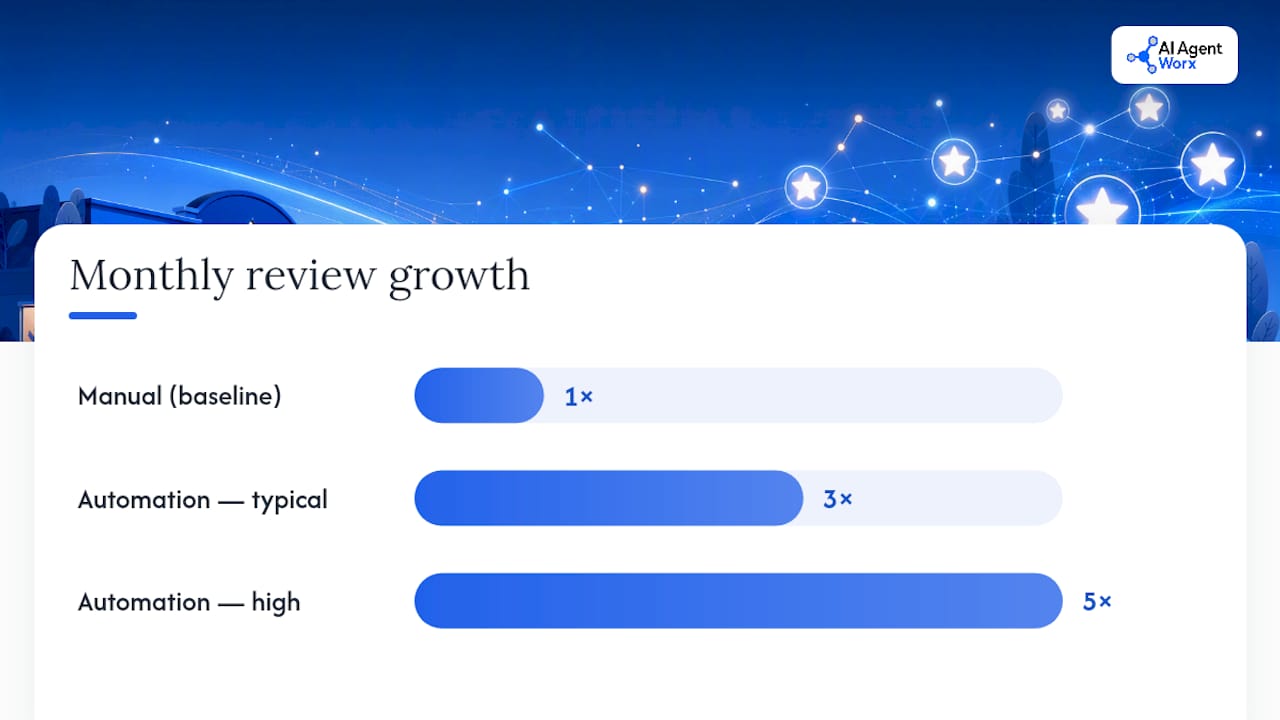
That consistency shows up directly in your numbers. Businesses that automate review requests typically see their monthly review count increase three to five times within the first 30 days. That's not a one-time spike either. It's what happens when you stop relying on memory and start relying on a trigger.
There's a search angle here too. Google's local algorithm weighs review recency and volume, so a steady stream of fresh reviews tends to support stronger local pack visibility, and that visibility feeds click-to-call and click-to-website conversions. Consumers lean hard on recommendations and reviews when choosing a local business, so a business with 40 recent reviews reads as more trustworthy than a competitor sitting on 12 reviews from two years ago, even if the actual service quality is identical.
Here's what automation typically delivers for an owner-led service business:
- Review velocity: 3 to 5x more reviews per month, based on industry benchmarks
- Local visibility: fresher review signals support stronger map-pack rankings
- Conversion lift: a well-reviewed listing converts more clicks into calls and bookings
- Staff time saved: zero manual follow-up, no sticky notes, no "I'll ask them later"
Pro Tip: Don't wait for a slow month to start. The businesses that see the biggest jump are the ones that turn on automation during their busiest season, when manual asking would have been skipped entirely anyway.
How Automated Review Requests Work, Step by Step
The mechanics are simpler than most software vendors make them sound. Here's the actual sequence:
- Pick your trigger. This is the event that fires the request: job marked complete, invoice paid, or appointment status changed to "done." Trigger choice matters more than people think. Trigger too early (before the job is finished) and you'll annoy customers or catch them mid-service. Trigger too late and the experience isn't fresh in their mind anymore.
- Send the first message. SMS goes out first, with a direct review link attached. Direct links, meaning a one-tap link straight to your Google review form using your Place ID, remove almost all the friction that kills response rates. Removing that friction is one of the highest-leverage things you can do in the whole flow.
- Wait for a response window. Give it a day or two.
- Send one follow-up. If the customer hasn't left a review, an email or a second SMS goes out as a gentle reminder. One follow-up only. More than that risks annoying the customer and can trigger spam flags on your messaging platform.
- Stop. No third ask. No nagging. The system moves on to the next customer.
For integrations, most modern review software connects natively to popular CRMs and booking platforms like Jobber, Housecall Pro, or ServiceTitan. When a native connector doesn't exist, Zapier or a webhook fills the gap, and some tools expose a direct API for custom setups. The speed of the send and the directness of the link are the two variables that move the needle most, so prioritize those over fancier features.
Channels and Timing: SMS vs. Email, QR Codes, and Send Windows
SMS wins for service businesses, and it's not close. Text messages typically get opened within minutes of arriving, and they convert at meaningfully higher rates than email for local service work. Email still has a role, but mostly as a backup channel for the follow-up step, not the opening move.
Timing depends on your business type. A quick transactional job, like a car wash or a haircut, does well with a 30 to 90 minute delay. Home services (plumbing, HVAC, landscaping) tend to hit their sweet spot at 1 to 2 hours after the job wraps, giving the customer time to actually use what you fixed or installed before you ask them to talk about it. Email, when used, performs better the next morning rather than same-day.
| Channel | Best Use Case | Recommended Timing |
|---|---|---|
| SMS (primary) | Home services, appointment-based businesses | 1 to 2 hours post-service |
| SMS (quick jobs) | Retail, quick-turn services | 30 to 90 minutes post-service |
| Email (follow-up) | Non-responders, older customer lists | Next morning |
| QR code | In-person leave-behinds, invoices, receipts | Immediate, self-timed |
QR codes work as a supplemental channel rather than a primary one. Print one on an invoice, a receipt, or a van decal, and it catches customers who are standing right there with their phone out. It won't replace a triggered SMS, but it's a low-cost way to capture reviews from people who slip through the automated flow.
Pro Tip: Benchmarks are a starting point, not gospel. Run two SMS variants and two send delays during your first 30 days and let your own response data tell you what actually works for your customer base.
What to Look For in Review-Request Software
Not every tool on the market is built for a small, owner-led business, and a lot of the feature lists are padded with things you'll never touch. Here's what actually matters:
- SMS sending with built-in opt-in handling. The tool should manage consent capture and unsubscribes automatically, not leave that on you.
- Direct review-link generation. It needs to build the one-tap Google review link using your Place ID without manual setup.
- Flexible trigger options. Job completion, invoice paid, appointment status. The more trigger types supported, the more accurately you can time the ask.
- A single follow-up rule. Not five. One well-timed reminder, then stop.
- Basic reporting. Requests sent, response rate, reviews generated. You don't need a dashboard with 40 charts.
On integrations, test the actual connection during any trial period, not just the sales demo. A native connector to your CRM or booking platform is smoother than routing everything through Zapier, though Zapier is a fine fallback if your platform isn't natively supported.
Pricing runs either per-send or as a flat monthly subscription. For a business doing 20 to 50 completed jobs a month, the subscription model usually pays for itself fast: even a modest lift in review volume tends to cover the monthly cost through the added local visibility and conversion boost alone.
Quick Setup Checklist: Get Your First Request Out This Week
You don't need a big project plan for this. Five steps, and you can be live by Friday.
- Identify your trigger and customer fields. Decide what event fires the request (job complete, invoice paid) and confirm you're capturing phone number and name at intake.
- Choose your channel and set the delay. SMS first, with a 1 to 2 hour delay for most home service work.
- Write a short SMS template with a direct link. Keep it under 160 characters: "Hi [Name], thanks for choosing [Business]! Mind leaving us a quick review? [Direct Link]"
- Enable exactly one follow-up. Set it to fire 48 hours after the first message if there's no response.
- Test it on yourself, then monitor. Send a test to your own number, confirm the link works, then watch the first week of real sends closely.
| Metric | What to Track |
|---|---|
| Requests sent | Total automated messages triggered |
| Completion rate | Percentage who click through and leave a review |
| New reviews/month | Raw count, compared to pre-automation baseline |
Compliance and Review-Platform Policy You Can't Skip
Google and other platforms explicitly forbid review gating, meaning you cannot filter which customers get asked based on how happy you think they'll be. Automating the request itself is fine; selectively routing only satisfied customers toward the ask, or offering discounts for positive reviews, is not. Every customer gets the same ask, every time.
SMS carries its own legal layer. The TCPA requires explicit, recordable opt-in before you text a customer, and a vague signup checkbox often isn't enough. Solid opt-in language names your business, states the purpose, and includes an opt-out instruction: something like "I agree to receive SMS from [Business Name] for appointment updates and review requests. Reply STOP to unsubscribe."
A short compliance checklist covers most of the risk:
- Capture explicit SMS opt-in at intake, not buried in fine print
- Build STOP/unsubscribe handling into your tool, don't manage it manually
- Cap follow-ups at one; more than two asks risks annoying customers and can trigger spam flags
- Never offer incentives or discounts tied to leaving a review
- Ask every customer equally, regardless of how the job went
How a Managed Setup Speeds Up Results
A done-for-you implementation follows a predictable path: discovery call to understand your booking or CRM system, trigger mapping so the request fires at the right moment, integration work, message templates, a testing round, then ongoing monitoring. That sequence is what CRM and messaging automation work usually looks like when it's built around an existing business rather than a generic template.
The value shows up most in what it prevents. DIY setups commonly stumble on the wrong trigger (asking before the job's actually done), a missing direct link (sending customers to a generic Google search instead of a one-tap form), or shaky compliance language that skips proper opt-in wording.
- Trigger mapped to the correct CRM or booking event, tested before launch
- Direct review link built and verified, not left to guesswork
- Opt-in language reviewed for TCPA basics before the first message goes out
- Monitoring in place so a broken integration gets caught in days, not months
Pro Tip: If your booking platform already has a native review integration, check it before building anything custom. Skipping that step is the single most common reason a DIY setup takes three times longer than it should.
Deciding Whether to DIY or Hire a Specialist
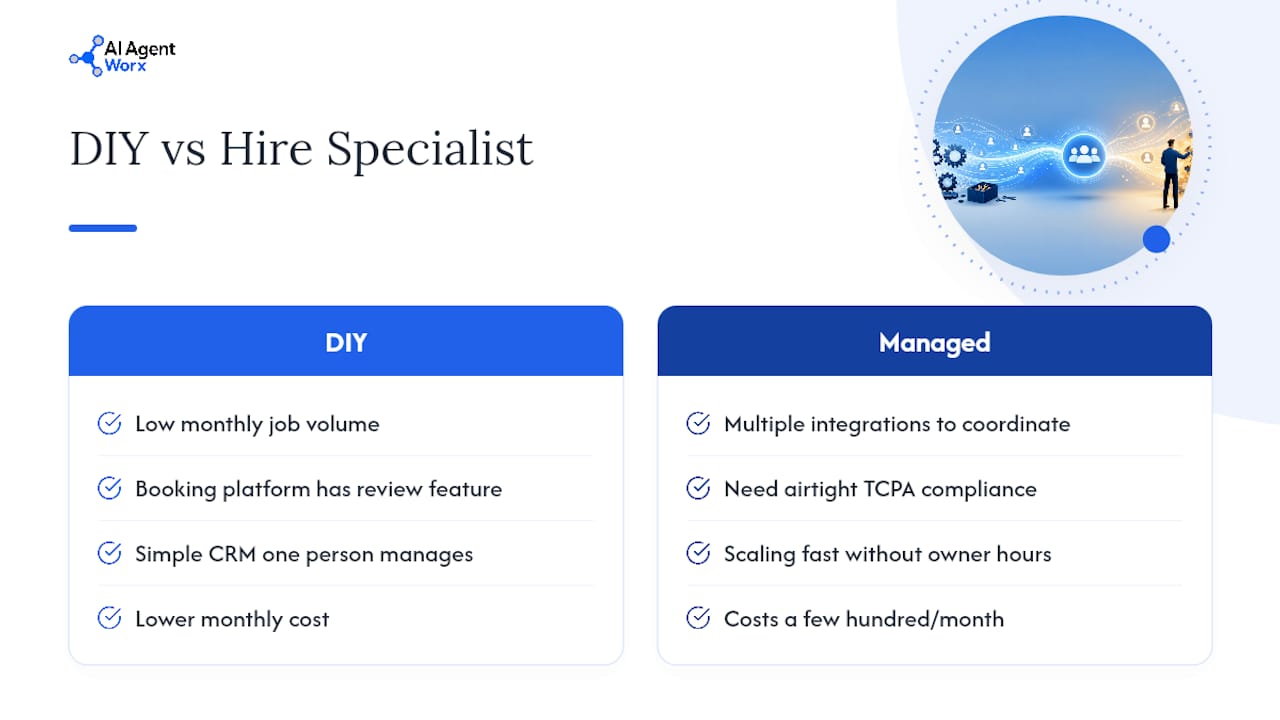
DIY makes sense when you're running low monthly job volume, already use a booking platform with a built-in review feature, and your CRM is simple enough that one person can manage the whole flow. Hiring out makes more sense once you're juggling multiple integrations, need airtight TCPA compliance across a growing customer list, or want to scale fast without spending your own hours untangling webhook errors.
Run the math on payback: if a managed setup costs a few hundred dollars a month and even a modest review increase drives a handful of extra booked jobs, it pays for itself. If you're DIY, start with the checklist above this week. If you're leaning toward managed, book a discovery call and bring your current booking or CRM login handy.
AI Agent Worx: A Done-For-You Alternative to Piecing It Together Yourself
Cobbling together Zapier, a texting app, and a spreadsheet works until it doesn't, usually right around the time a trigger breaks and nobody notices for three weeks. Some providers build the whole review request flow for you: trigger mapping tied to your booking or CRM system, direct review links, TCPA-safe opt-in language, and a single follow-up rule, all tested before going live.

A typical engagement starts with a short discovery call to look at how your business currently books and closes jobs, then moves into integration, template writing, testing, and ongoing monitoring so you're not the one checking whether messages actually sent. This sits alongside the CRM and messaging automation and workflow automation work Aiagentworx already does for appointment-driven businesses, so review requests plug into systems you're likely already using rather than becoming one more disconnected tool.
If you'd rather have this running correctly in a week than spend three weekends debugging a webhook, check out the services page and book a discovery call.
Sources
- Review Automation for Small Businesses: 2026 Guide | Plaudit
- Google Review Automation for Local Businesses (2026 Guide) | Endigita
- Review Automation for Small Business: A Practical Guide | RelinkAI
- What marketers need to know about SMS compliance in the US | Attentive
FAQ
Is Review Gating Illegal?
Review gating violates Google's platform policies rather than a specific statute, but it can get your listing flagged or reviews removed. Automating the request to every customer equally is fine; filtering who gets asked based on expected sentiment is not.
What Is the Best Way to Request a Review?
Send a short SMS with a direct review link 1 to 2 hours after job completion, then follow up once if there's no response. This cadence tends to produce the highest response rate without over-contacting customers.
What Is a Review Request?
A review request is a message, typically SMS or email, asking a customer to leave a public review of their experience, usually sent with a direct link to the review platform to reduce friction.
How Do I Use AI to Generate Reviews?
You shouldn't use AI to write or fabricate reviews. What AI-powered automation can legitimately do is trigger the request at the right time, personalize the message, and manage follow-ups, while the actual review still comes from the real customer.
How Much Does Review Request Automation Cost?
Pricing varies by provider and typically runs on a per-send or monthly subscription model. For exact current pricing on a managed setup, check the Aiagentworx services page directly.