
Claim your profile, verify it, lock in the right primary category, and get your name, address, and phone number exact across the board. That's the move. Do those four things first and you unlock eligibility to show up in the Local Pack at all, plus more accurate answers when someone asks Gemini "who's the best plumber near me." Everything else, photos, posts, reviews, is maintenance you keep running every week after.
TL;DR:
- Prioritize claiming, verifying, and ensuring your business name, address, and phone number are consistent across all platforms to unlock local search visibility.
- Focus on selecting the most specific primary category and maintaining accurate NAP details to improve relevance and trust signals for local ranking.
- Regularly upload about thirty recent photos, including storefront, interior, team, and completed work, and update these at least once a month for ongoing activity signals.
- Build a steady review collection strategy by asking satisfied customers immediately after service, avoiding incentives, and replying promptly to all reviews.
- Migrate FAQ content into structured schema on your website's service pages, as Google’s new Ask Maps pulls answers from verified, schema-labeled information instead of the old Q&A feature.
Table of Contents
- What Google Business Profile Optimization Actually Means in 2026
- How Do I Claim and Verify My Google Business Profile?
- Complete the Core Profile Fields First
- Should I List Every Service on My Profile?
- Photos and Video: How Many Do You Actually Need?
- Building a Review Strategy That Actually Moves Rankings
- What's a Realistic Posting Cadence?
- What Is Ask Maps and How Does It Change FAQ Strategy?
- Tracking the Numbers That Actually Tell You Something
- The 90-Minute Quarterly Maintenance Checklist
- Why Sequence Beats Effort Every Time
- How Aiagentworx Handles the Heavy Lifting
- Official Documentation and High-Signal Guides
- Sources
- FAQ
What Google Business Profile Optimization Actually Means in 2026
Google Business Profile optimization means systematically improving the fields, media, and activity signals Google uses to decide who shows up in local search results and Ask Maps answers. It's not a one-time form you fill out. It's an ongoing input pipeline that feeds both the classic Local Pack and Google's newer AI-driven answer layer, Gemini inside Maps.
Google has said publicly that its local ranking algorithm runs on three factors: relevance, distance, and prominence. You have zero control over distance. That means every optimization dollar and hour you spend should go toward relevance (does your profile accurately match what the searcher typed) and prominence (does Google trust you enough to rank you above the next guy). That's the whole game. Category and NAP accuracy drive relevance. Reviews, citations, and activity drive prominence.
If you're searching "optimize Google My Business" or "improve Google Maps ranking," you're really asking how to move those two levers. This guide walks through it in the order that actually moves the needle, starting with the gate you have to pass before anything else works.
How Do I Claim and Verify My Google Business Profile?
You claim it through Google Business Profile by searching your business name, and you verify it through whichever method Google offers your account. No verification, no ranking. Full stop. An unverified profile can sit in limbo indefinitely and never surface in map results, even if every other field is perfect.
The claim process breaks into a short sequence:
- Search your business name and address on Google or in Google Maps to see if a listing already exists (created by a customer review or a data aggregator).
- If it exists, click "Own this business?" and start the claim flow. If it doesn't, create a new profile from scratch inside the Business Profile dashboard.
- Choose a verification method: postcard by mail, phone call, email, or, for larger accounts, domain or bulk verification.
- Enter the code Google sends and wait for confirmation, usually instant for phone or email, five to fourteen days for postcard.
Postcards get lost more than you'd think. If two weeks pass with nothing, request a resend before assuming it's stuck. A rejected business name usually means Google flagged it as keyword-stuffed (like "Bob's Plumbing Best Emergency 24/7 Service") and you'll need to resubmit using your actual legal or DBA name. Duplicate listings are their own headache: if a second profile pops up for the same address, request removal through Google's duplicate-listing tool rather than trying to verify both, because Google will eventually suppress or merge them anyway, often at the worst possible time.
Complete the Core Profile Fields First
Once you're verified, the fields you fill out next carry unequal weight. Some are ranking fuel. Some are just nice to have. Prioritize in this order.
- Primary category. This is the single strongest relevance signal you control, according to local search ranking factor research. Pick the most specific option available, "Family Dentist" beats "Dentist," "Wood-Fired Pizza Restaurant" beats "Restaurant." Then add secondary categories up to the limit Google allows, but only ones that genuinely describe services you offer.
- NAP consistency. Your name, address, and phone number need to match, character for character, across your website, your GBP listing, and every citation site (Yelp, Apple Maps, industry directories). A mismatched suite number or an old phone number floating on a directory from three years ago quietly erodes trust signals.
- Hours and holiday hours. Set regular hours accurately, then update holiday hours ahead of every major closure. Storefronts should show exact open and close times. Service-area businesses (plumbers, cleaners, mobile mechanics) should set a service radius instead of a walk-in address and hide the street address if you don't take walk-ins.
- Attributes. Toggle on what's true: wheelchair accessible, women-owned, accepts Apple Pay, outdoor seating. These don't move rankings much on their own, but they're what filters searches when someone taps "accessible" or "open now" in Maps.
Skip the temptation to jam keywords into your business name field. Google polices that aggressively, and a suspended profile ranks nowhere.
Should I List Every Service on My Profile?
Yes, but broken into specific line items rather than vague categories, because Google indexes services independently of your primary category and that's extra surface area for matching long-tail searches. A general contractor who only lists "General Contracting" is invisible to someone searching "kitchen remodel contractor near me." Split it out: kitchen remodels, bathroom remodels, deck construction, each with a two or three sentence description using the words customers actually type.
A few rules keep this section working for you instead of against you:
- Write each service description in plain language a customer would search, not internal jargon.
- Add products where relevant (retail, restaurants, salons) since Products and Services show up as distinct browsable sections on your profile.
- Treat attributes as conversion signals, not ranking boosts, they help someone decide to click "Call" once they've already found you, but most of the direct ranking weight sits with category, reviews, and NAP accuracy.
- Never list a service you don't actually perform just to catch more searches. Google's policy team treats over-claiming as a suspension trigger, and getting reinstated costs far more time than the extra traffic was worth.
Photos and Video: How Many Do You Actually Need?
Going from zero to about thirty photos is the single biggest visibility lift you'll get from media, according to guidance on Ask Maps and how it changes profile expectations. After that baseline, recency matters more than volume. A profile with fifteen photos uploaded in the last quarter reads as more active to Google's vision models than one with three hundred photos frozen from 2022.
Upload in this order of priority:
- Exterior shot so people recognize your storefront when they drive by.
- Interior shots that show the actual environment customers will walk into.
- Team members at work, not posed headshots.
- Product or completed-job photos (finished kitchens, plated dishes, styled haircuts).
- Logo and a cover photo that represents the brand at a glance.
Maintain with one to two fresh uploads per month once you clear that thirty-photo baseline. Skip stock photography and AI-generated images entirely. Gemini's vision models are increasingly good at flagging synthetic or stock imagery, and a profile that looks staged undercuts the authenticity signal Google is explicitly trying to reward.
Pro Tip: Snap photos on your phone right after finishing a job, while the site is still clean and the lighting is good. Upload directly from your phone's Google Business Profile app instead of batching them for "later," because later rarely happens.
Building a Review Strategy That Actually Moves Rankings
Review volume, recency, and average rating together form a big chunk of your prominence score, and steady velocity beats a one-time spike every time, per analysis of the GBP signals that move local rankings. Ten reviews collected over a weekend and then silence for six months signals less trust to Google than two reviews a week, every week, indefinitely.
- Ask at the moment of peak satisfaction, right after service completion, not three weeks later in a generic email blast.
- Use a direct review link (Google gives you a shareable one) via text message, email receipt, or a printed card at checkout. Never offer a discount or incentive tied to leaving a review; that violates Google's policies and risks the whole profile.
- Reply to every review, positive or negative, within 48 to 72 hours. Reference the actual service in your reply ("Glad the water heater install went smoothly, Sarah") instead of a copy-pasted "Thanks for your feedback!"
- Triage negative reviews fast: apologize, offer to resolve offline, and only escalate to Google's review-flagging tool if the review violates policy (fake, off-topic, or from a non-customer).
Reply speed alone won't fix a legitimate service complaint, but it shows every future reader that you're paying attention, and that's exactly what prominence rewards.
What's a Realistic Posting Cadence?
One post per week, three to five new photos per month, and a review-reply turnaround under 72 hours. That's the whole cadence, and it's sustainable for a one-person marketing operation.
- Weekly post: rotate between a recent completed job, a limited-time offer, and an upcoming event or seasonal reminder. Keep the copy to two or three sentences with one clear photo.
- Monthly photos: batch a phone session once a month covering whatever you finished recently, then upload three to five over the following weeks instead of dumping them all at once.
- Review replies: check daily or set up an alert so nothing sits unanswered past three days.
- Automation: scheduling tools and a basic workflow automation setup can queue posts and flag new reviews for reply without you checking the dashboard manually every morning.
A compact maintenance routine like this preserves freshness without eating a full workday, and freshness is exactly what keeps a profile from going stale in Google's eyes.
What Is Ask Maps and How Does It Change FAQ Strategy?
Google discontinued the public Questions & Answers feature on Business Profiles and replaced it with an AI-driven experience called Ask Maps, powered by Gemini, according to reporting on the Q&A removal. That old Q&A box you used to seed with your own questions no longer controls what customers see. Ask Maps pulls from your reviews, website, and structured data instead, and static text sitting unused in a dead feature does nothing for you anymore.
The migration follows three moves, easy to remember as A.S.K.:
- Structure your existing FAQs by service page rather than as one generic list. A roofing company should have separate FAQ blocks under "roof repair" and "roof replacement," not one catch-all page.
- Keep each answer concise, two to three sentences, written the way a customer would ask it out loud.
- Add FAQPage schema markup to those service pages and cross-publish the strongest questions as Google Posts so both your website and Maps carry the same structured signal.
Q&A used to be a manipulation vector, business owners planting their own softball questions. Ask Maps favors schema-tagged, verifiable content pulled from multiple sources instead, so replicating the old trick gets you nowhere.
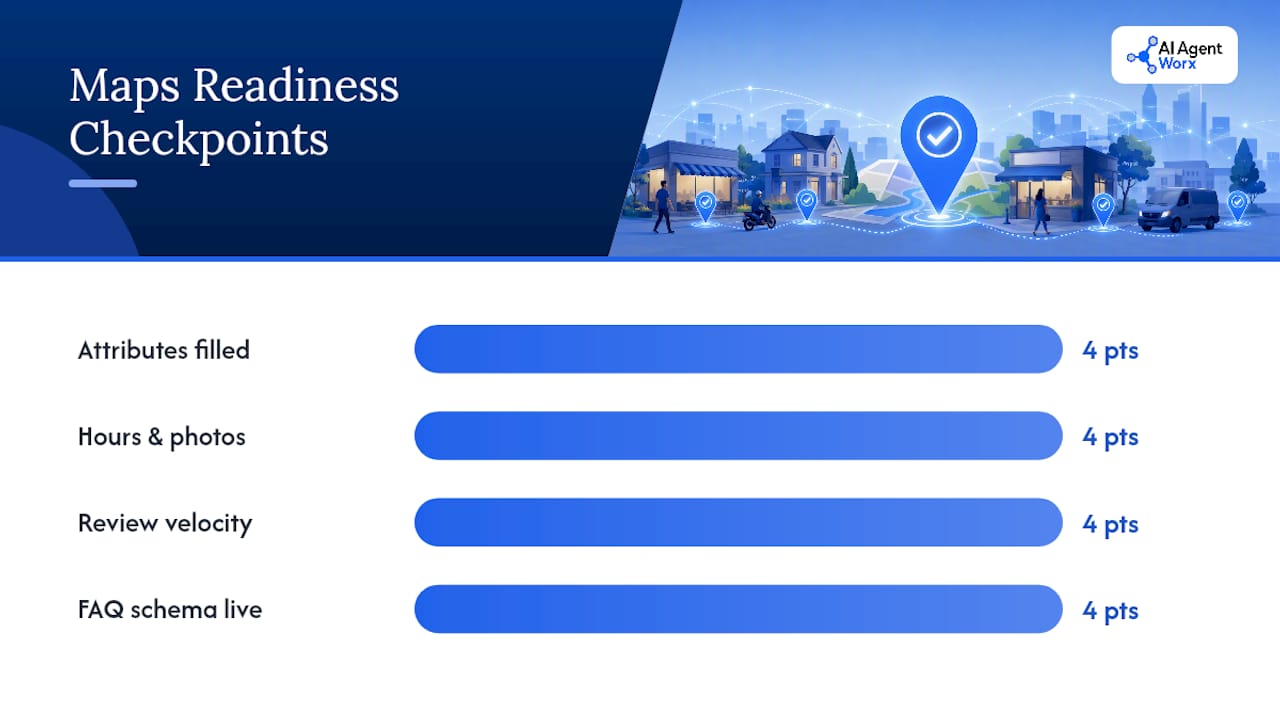
Run a quick 0 to 16 readiness check across four categories, scoring four points each: attributes filled in, hours and photos current, review velocity steady, and FAQ schema live on your top service pages. Anything under 8 needs triage this month. Export any historical Q&A content you still have access to through your reputation management tool, then migrate the highest-traffic questions straight into those service-page FAQ blocks. A GEO-focused structured data pass on your website closes the loop between what your profile says and what your site's schema confirms.
Tracking the Numbers That Actually Tell You Something
Profile views, the split between search and maps discovery, direction requests, phone calls, and website clicks are the five numbers worth checking monthly inside Google Business Profile Insights. A jump in views with no change in calls usually means your listing looks good but your offer or pricing doesn't close the deal once someone clicks through.
- Category and description changes typically show ranking movement within one to two weeks.
- Review and photo activity compounds slower, expect a real prominence shift over four to eight weeks of consistent effort.
- Run a monthly five-minute audit: confirm NAP hasn't drifted, categories haven't reset (Google occasionally auto-suggests changes), and no unauthorized edits crept in from a data aggregator.
- Contact Google Business Profile support directly for suspensions or verification failures; use a reputation management tool for review monitoring at scale.
Watching these metrics against your actual lead pipeline is what turns "the profile looks fine" into "the profile is generating booked jobs."
The 90-Minute Quarterly Maintenance Checklist
Block ninety minutes every quarter and run through this in order:
- Confirm primary and secondary categories still match your current service mix (10 minutes).
- Review and refresh your services list for anything added or discontinued (10 minutes).
- Upload 10 recent photos covering jobs, team, and location (20 minutes).
- Reply to every unanswered review (20 minutes).
- Publish one fresh post (10 minutes).
- Check that FAQPage schema is live and matches current service pages (20 minutes).
Split this across a small team: one person handles photos and posts, another handles review replies, and someone with basic technical access checks the schema. If you'd rather hand the whole block to a contractor, a partner specializing in business process optimization can build the checklist into a repeatable quarterly hand-off.
Pro Tip: Set a recurring calendar reminder tied to the first Monday of each quarter. Profiles that skip even one cycle tend to show a visible dip in Insights by the following quarter.
Why Sequence Beats Effort Every Time
Most business owners attack Google Business Profile optimization backward. They obsess over posting streaks and review counts before their category and NAP are even locked down. That's optimizing prominence on top of a shaky relevance foundation, and Google's algorithm doesn't reward effort out of order.
The sequence that works is boring but reliable: relevance first (category, NAP, service list), then content (photos, FAQ schema), then continuous prominence work (reviews, posts) running in the background forever. Skip step one and no amount of review velocity fixes a profile Google doesn't consider relevant to the search in the first place.
DIY is fine through the profile setup and the quarterly checklist if you've got an hour or two to spare each month. Where most owners actually get stuck is the Ask Maps migration, structuring FAQ schema correctly takes a technical pass most small business owners have never done before, and getting it wrong means Gemini keeps pulling stale or incomplete answers about your business. That's the point where hiring a specialist stops being a luxury and starts being the faster path to the same result.
— Brian
How Aiagentworx Handles the Heavy Lifting
Aiagentworx is the option for owners who've read this whole checklist and thought, "I don't have ninety minutes a quarter, let alone a week." We handle Google Business Profile setup, FAQ schema migration for the Ask Maps era, and automated review request and reply workflows, so your profile stays fresh without you touching the dashboard.

A typical engagement starts with a discovery call to audit your current profile, then moves into a project phase (category cleanup, photo upload, schema build) followed by ongoing maintenance, posts, review monitoring, ranking checks, so the work doesn't quietly lapse after month one. It's built for owner-led service businesses that need the profile working while they're actually out doing the job. Book a discovery call through our services page or explore GEO and structured data if the Ask Maps migration is your immediate bottleneck.
Official Documentation and High-Signal Guides
- Google Business Profile Help covers verification steps and official ranking guidance direct from Google.
- Local search ranking factors breaks down category weighting in more technical detail.
- Google Business Profile Q&A Removed: What to Do Now explains the Ask Maps transition in full.
Sources
- Tips to improve your local ranking on Google
- Local search ranking factors
- Google Business Profile: The Complete 2026 Guide
FAQ
How Do I Optimize My Google Business Profile?
Claim and verify the listing first, then lock in your most specific primary category and exact NAP details. After that, build out services, upload photos consistently, and run a steady review-and-reply cadence every week.
How Much Does Google Business Profile Optimization Cost?
DIY optimization costs nothing but your time, roughly a few hours upfront and ninety minutes quarterly. Hiring a specialist runs on a project-plus-maintenance fee structure, priced during a discovery call based on your current profile's condition and goals.
How Do I Optimize My Google Business Profile in 2026?
The 2026 approach adds one critical step beyond the classic checklist: migrating any old Q&A content into FAQPage schema on your service pages, since Ask Maps now pulls answers from structured data rather than the retired public Q&A feature.
Is Google Business Profile Being Discontinued?
No, the platform itself isn't going anywhere. Google discontinued specific features, most notably the public Q&A section, replacing them with the AI-driven Ask Maps experience powered by Gemini.