
Automating client onboarding cuts the busywork, gets new clients to their first result faster, and stops the early churn that quiet gaps in the process create. The first move isn't buying software. It's mapping your current onboarding path, step by step, so you know exactly where clients stall before you automate anything. AI Agent Worx builds these systems for owner-led businesses, and the pattern is always the same: fix the map first, then automate.
TL;DR:
- Mapping the full onboarding process reveals undocumented steps and helps avoid costly rework before automating.
- Segmenting tasks into rules-based and judgment calls ensures automation handles only repetitive activities, preserving human decision-making.
- Building conditional branches tailored to client types improves onboarding efficiency and reduces delays caused by one-size-fits-all workflows.
- Piloting automation on a single client segment for 30 days allows data-driven adjustments and minimizes the risk of widespread issues.
- Key KPIs include completion rate, time-to-value, first-pass accuracy, and portal engagement, which should be monitored weekly during initial rollout.
Table of Contents
- Why Automate Client Onboarding?
- The Seven-Step Client Onboarding Automation Framework
- What Should Your Onboarding Tools Actually Do?
- How Do You Roll Out Onboarding Automation Without Breaking Things?
- Which KPIs Actually Matter, and How Do You Track Them?
- How Aiagentworx Approaches Onboarding Implementation
- The Mistake Nobody Talks About
- How Aiagentworx Fits Into Your Onboarding Fix
- Sources
- FAQ
Why Automate Client Onboarding?
Bad onboarding is a quiet churn machine. Clients don't complain loudly when a welcome email gets missed or a contract sits unsigned for four days. They just get a bad first impression and start shopping around. Automated onboarding fixes activation speed and cuts the operational cost of getting someone from "signed" to "actually using what they paid for," according to Mailchimp's breakdown of automated customer onboarding.
Here's what usually breaks in a manual process:
- Duplicate data entry. The same client info gets typed into a contract, a CRM, and a project tool, three times, by three different people.
- Delays from single-point ownership. One person forgets to hand off a client, and the file goes cold for a week.
- "Process by silence." Nobody follows up if a client doesn't fill out a form, so the whole onboarding just stalls without anyone noticing.
- Missing accountability. Tasks exist in someone's head, not in a system, so when that person is out, onboarding stops.
Automation doesn't fix everything, and it shouldn't try to. Judgment calls, like deciding how to handle a client who's clearly a bad fit for your standard package, stay human. What you automate is the repetitive, rules-based stuff: reminders, data entry, routing, status updates.
Pro Tip: If you can't describe a step in a single sentence without saying "it depends," that step probably needs a human, not a workflow.
The math on staff time is straightforward even without a hard external benchmark: every hour your team spends manually chasing signatures or re-entering data is an hour they're not spending on strategy or client relationships. SHRM's analysis of automation in HR-adjacent processes found that automating repetitive administrative tasks lowers both cost and error rates, a pattern that holds just as well for client onboarding as it does for benefits processing.
The Seven-Step Client Onboarding Automation Framework
This is the sequence that works, in order. Skip a step and you'll usually pay for it later with rework.
-
Map the full process, contract to go-live. Write down every step your current onboarding actually takes, not the version in your SOP doc. Talk to whoever handles onboarding day to day. You'll almost always find undocumented side paths, like the workaround someone built for enterprise clients that nobody wrote down. Zapier's onboarding automation guide makes this the mandatory first step for exactly this reason.
-
Separate automation-ready tasks from judgment calls. Sending a welcome email is automatable. Deciding whether a client needs a custom contract clause is not. Sort your mapped steps into these two buckets before you build anything.
-
Design conditional branches for client segments. A solo consultant client and an enterprise client shouldn't run through identical onboarding. Build branching logic so the system routes each client type down the right path automatically, based on contract value, service tier, or industry.
-
Build intake forms and a client portal. Use dynamic forms that pre-populate from your CRM so clients aren't retyping information you already have. Make the portal mobile-first. A surprising number of clients fill out onboarding paperwork from their phone between meetings, and a form that breaks on mobile kills momentum right when it matters most.
-
Automate task creation, routing, and reminders. Once a form is submitted, a signed contract lands, or a milestone hits, the system should spin up the next task automatically and assign it to the right person, no manual handoff required.
-
Add escalation rules and monitoring alerts. If a client hasn't completed a step in 48 hours, someone should get pinged. This is the fix for "process by silence." Set thresholds that trigger a human check-in before a stalled file becomes a lost client.
-
Measure KPIs, pilot for 30 days, and iterate monthly. Launch with one client segment, watch completion rate and time-to-value closely, and adjust. A 30-day pilot with tight KPIs surfaces blocking issues fast, far faster than a slow six-month rollout would.
Pro Tip: Run verification and document collection in parallel, not one after the other. Middesk's guidance on automated KYB checks shows that serial verification steps are one of the most common places onboarding timelines quietly balloon.
What Should Your Onboarding Tools Actually Do?
Forget vendor names for a second. What matters is whether each category of tool does its specific job well, and whether they talk to each other cleanly. Here's the capability checklist:
- Intake forms: dynamic, conditional fields, pre-fill from existing records.
- E-signature: legally binding, tracks status, triggers the next workflow step automatically.
- Identity or business verification: handles KYB/KYC checks and, where relevant, sanctions screening against resources like OFAC's compliance database.
- Client portal: single login, mobile-friendly, shows real-time onboarding progress.
- CRM: acts as the canonical record. Every other tool should write back to it, not maintain its own separate version of the truth.
- Scheduling: books calls and milestones without back-and-forth email.
- Payment processing: handles invoicing and collection tied to onboarding milestones.
- Document storage: centralized, searchable, permission-controlled.
- Workflow engine: the glue that triggers actions across all the above.
On integration patterns, you've got three real options: native integrations built into the platforms themselves, middleware connectors that sit between disconnected tools, or an API-first architecture you build custom. Native integrations are fastest to set up. Middleware gives you more flexibility when your tools don't talk to each other out of the box. API-first is the most powerful but needs real technical investment to maintain.
Whichever you choose, pick one system as the canonical record, almost always your CRM, and route everything else to write back into it. This is the single biggest fix for the duplicate-data problem. A tool like CRM and nurture automation built around this principle keeps every client record consistent no matter how many tools touch it. If your onboarding involves financial or regulated services, add verification checks before you scale volume, not after.
How Do You Roll Out Onboarding Automation Without Breaking Things?
Don't automate everything at once. Pick one client segment, ideally your most common and least complex one, and automate that path completely from intake to go-live before touching anything else.
- Scope the pilot narrowly. One segment, one full path, end to end. Resist the urge to build for every edge case in version one.
- Set your timeline by scope. Intake-only automation typically takes 2 to 4 weeks. A full onboarding pipeline, forms through KPI dashboards, runs 6 to 12 weeks depending on how many systems you're connecting, per PepperEffect's implementation benchmarks.
- Assign clear ownership. You need a sales handoff owner, an onboarding process owner, a technical owner who maintains the integrations, and a support fallback for when something breaks.
- Test before launch. Check data accuracy end to end, run a real user through the mobile experience, and confirm your fallback flow actually reaches a human when it should.
- Manage the change internally. Write communication templates for clients, update your SOPs, and train your team on the new handoff points before go-live day, not after.
Pro Tip: Tell your team the pilot is temporary and reversible. People resist change less when they know you're testing, not replacing their judgment permanently on day one.
Which KPIs Actually Matter, and How Do You Track Them?
Four numbers tell you almost everything about whether your onboarding automation is working: completion rate, time-to-value, first-pass completion rate, and portal adoption.
| KPI | What it measures | Where to instrument it |
|---|---|---|
| Onboarding completion rate | Percentage of clients who finish every step | CRM stage-tracking field |
| Time-to-value | Days from signing to first meaningful result | Timestamp fields, CRM automation logs |
| First-pass completion rate | Percentage completing forms correctly without resubmission | Form platform analytics |
| Portal adoption | Percentage of clients actively logging in and using the portal | Portal login event tracking |
PepperEffect's onboarding framework treats completion rate and time-to-value as the two headline metrics worth watching weekly during a pilot, then monthly once the system stabilizes. Set up alerts for any client stalled more than 48 hours on a single step. A dashboard nobody checks is just decoration, so build your review cadence into someone's actual job, not a someday task.
How Aiagentworx Approaches Onboarding Implementation
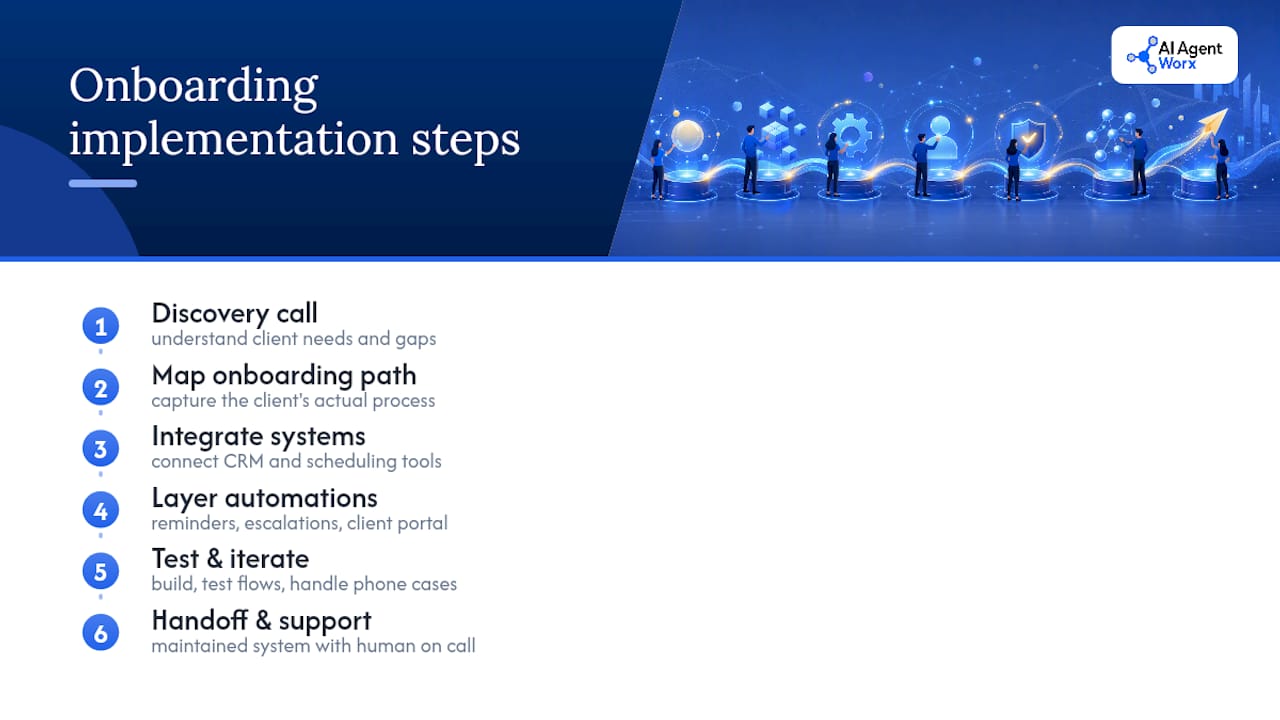
There are providers that build automation systems for small and medium businesses, not just slide decks about automation systems. That distinction shapes everything about how an engagement runs: discovery call, process map, build, test, and handoff to a maintained system, with humans on call when something needs a judgment call the automation shouldn't make alone.
A typical engagement starts with mapping the client's actual onboarding path, connecting it to existing CRM and scheduling tools, then layering in reminders, escalation rules, and a client portal, usually alongside phone and follow-up automation so nothing falls through when a client calls instead of clicking a link.
The Mistake Nobody Talks About
The biggest onboarding mistake isn't a missing tool. It's automating a broken process and making the breakage faster. Map the workflow honestly first, including the ugly undocumented parts, before you build anything. Then pilot one segment for 30 days and let the data, not your assumptions, tell you what to fix next.
— Brian
How Aiagentworx Fits Into Your Onboarding Fix
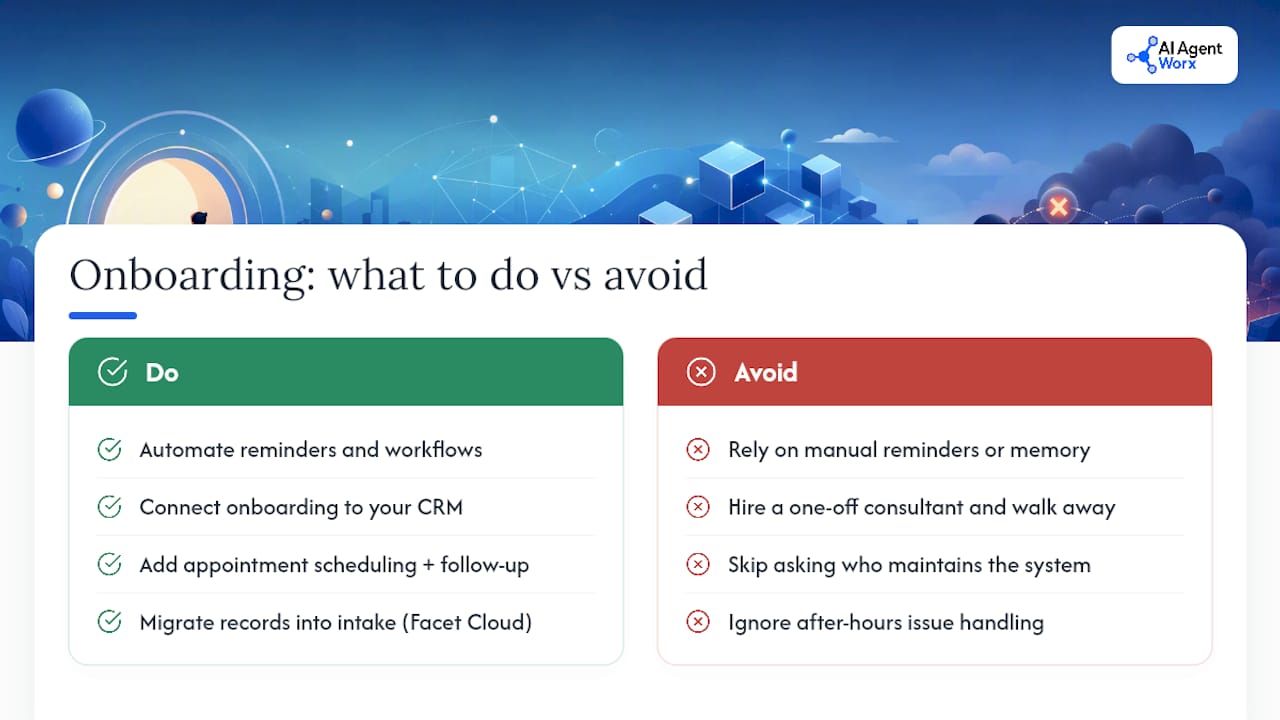
This approach differs from hiring a consultant who hands you a strategy deck and disappears; some providers build the actual system: the forms, the CRM connections, the reminders, and the escalation rules that help onboarding run without constant supervision.

If your onboarding runs on manual reminders and someone's memory, that's exactly the bottleneck workflow and business process automation is built to close. We connect it to CRM, messaging, and nurture automation so your client records stay consistent everywhere, and pair it with appointment scheduling and follow-up so bookings and reminders happen without a human chasing them down. When evaluating an implementation partner, it's important to ask about their build process, who maintains the system after launch, and how issues are handled outside normal business hours.
Data migration into your intake process gets easier with tools like Facet Cloud for transferring existing client records without manual re-entry.
Book a discovery call through our services page and we'll map your current onboarding process together before recommending anything.
Sources
For more implementation detail, see Zapier's onboarding tutorial, Middesk on KYB verification, and Workato's automation guide.
- The Power of Automated Customer Onboarding - Mailchimp
- Client Onboarding Automation: From Paper Flood to Frictionless Welcome Journey - PepperEffect
- SHRM resource on automation reducing benefits costs
FAQ
How Do I Automate My Onboarding Process?
Start by mapping your current process end to end, then separate repetitive tasks from judgment calls. Build intake forms, connect them to your CRM, and automate task routing and reminders using the seven-step framework before scaling to every client segment.
What Are the Seven Steps of the Client Onboarding Process?
The seven steps are mapping the process, sorting automatable tasks from judgment calls, designing conditional branches, building intake forms and a portal, automating task routing, adding escalation alerts, and measuring KPIs through a pilot. This sequence comes from PepperEffect's onboarding automation framework.
What Is the Client Onboarding Process, Exactly?
It's every step between a signed contract and a client getting real value from your service, including intake, verification, task assignment, and communication. A well-designed process removes friction at each handoff point so clients don't stall or drop off.
How Do I Streamline Client Onboarding Without a Big Budget?
Start small with one client segment and automate just the intake and reminder steps first, since intake-only automation typically takes 2 to 4 weeks to implement. A qualified implementation partner can scope a pilot engagement so you see results before committing to a full pipeline build.
Does Aiagentworx Build Custom Onboarding Systems?
Yes. Aiagentworx designs and implements workflow automation, CRM integration, and scheduling systems tailored to how a specific business actually onboards clients. Pricing depends on scope and is available after a discovery call listed on the services page.