
If you're a small business missing calls during lunch rushes, after hours, or peak season, automated call answering will pay for itself fast. It books appointments, captures leads, and answers routine questions without a human on the line. The catch: it needs real setup and testing, and sensitive or complicated calls still need a person ready to jump in.
TL;DR:
- Automated call answering systems that perform actions, such as booking appointments or updating CRM data, typically handle 70 to 80 percent of routine calls reliably.
- Key features to evaluate include real-time calendar sync, CRM integration, context-aware routing, fallback policies, and thorough testing with realistic call scenarios to ensure effectiveness.
- The most common issues during rollout are insufficient testing and unclear handoff policies, which can lead to increased human workload and customer dissatisfaction.
- Costs vary widely depending on pay structure, concurrency, and customization, and total ownership should include training, maintenance, and integration expenses.
- For best results, businesses should conduct a detailed trial focusing on resolution and transfer rates, and choose vendors that prove they can handle complex, realistic calls under their operational conditions.
Table of Contents
- What Does Automated Call Answering Actually Do?
- What Features Actually Matter When You're Comparing Solutions
- Does This Technology Actually Work Reliably?
- What Does Automated Call Answering Cost?
- How to Roll Out Automated Call Answering Without Disrupting Your Business
- Which Businesses See the Biggest Return?
- How Do You Choose the Right Vendor or Consultant?
- How AI Agent Worx Builds This for Small Businesses
- The Biggest Mistake I See Owners Make
- Ready for an AI Phone Receptionist That Actually Books the Appointment?
- Sources
- FAQ
What Does Automated Call Answering Actually Do?
Forget the old "press 1 for sales" phone tree. That's IVR, and it's a script. You say a word, it plays a recording, you go in circles. Modern automated call answering is a different animal entirely. It's built on conversational AI that actually understands what a caller is asking and does something about it.
Here's the stack, broken down simply. First, speech recognition (ASR) turns the caller's voice into text in real time. Then intent classification figures out what they actually want. Are they trying to book an appointment? Asking about hours? Reporting an emergency? Next comes action execution. This is the part that separates a real AI receptionist from a glorified voicemail box. The system doesn't just note "customer wants appointment." It opens your calendar, checks availability, and books the slot. Then text-to-speech (TTS) reads the confirmation back to the caller in a voice that sounds like an actual person, not a robot from 2003.
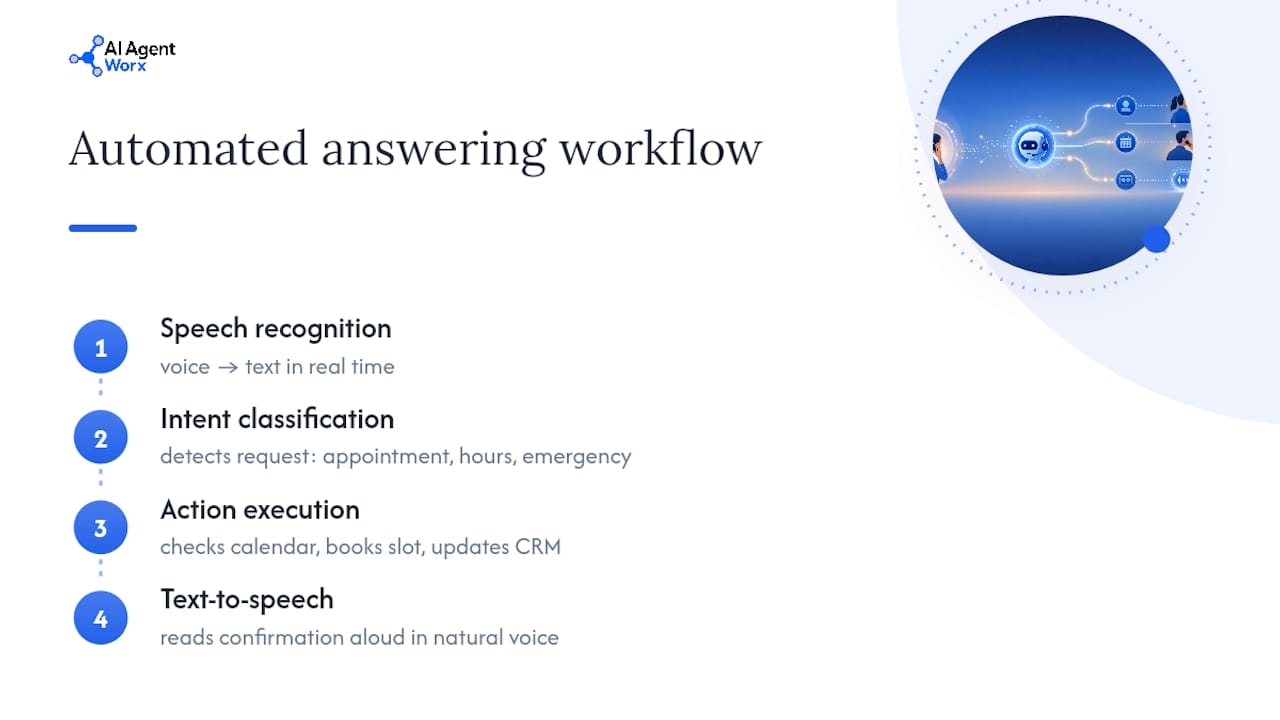
Salesforce breaks this down the same way: ASR, intent classification, action execution, and CRM integration, layered together. Salesforce makes a point worth repeating here. Action execution is what separates a chatbot from an AI receptionist. A chatbot chats. A receptionist does things.
That word "resolve" gets thrown around loosely in this space, so let's be precise about it. A system that resolves a call books the appointment, updates the record, and sends the confirmation text, all without a human touching it. A system that only "handles" a call takes a voicemail and hopes someone calls back before the customer gives up and dials your competitor. IVR was built for the second kind of outcome. Conversational AI, done right, is built for the first.
Where this gets practical for you: automated phone attendant tools that only transcribe and route are basically fancy voicemail with better UX. The systems worth paying for take action, not notes. When you're comparing a call answering system to what you have now, ask one question: does it do something, or does it just record something? RingCentral notes that the better tools also work with your existing business number, so switching doesn't mean reprinting every business card and sign you own.
What Features Actually Matter When You're Comparing Solutions
Vendor pitch decks love to talk about "natural conversations" and "human-like AI." Those are marketing words. Here's what actually determines whether a system saves you money or wastes it.
- Appointment booking with live calendar sync. The system needs to see real-time availability in your calendar tool and lock in the slot on the call, not queue it for manual entry later.
- CRM and lead capture integration. Every caller's name, number, and reason for calling should land in your CRM automatically, tagged and ready for follow-up. If your team is copy-pasting notes from a call log into a spreadsheet, the integration failed.
- Context-aware routing and concurrency. Can it handle six calls at once during a Monday morning rush, and route a billing question differently than a new patient inquiry? Concurrency is the difference between a tool that scales and one that chokes at exactly the moment you need it most.
- Custom knowledge base training. Your hours, pricing tiers, service area, and common exceptions need to live somewhere the AI can pull from. Generic scripts fail the second a caller asks something specific to your business.
- Fallback and handoff policy. When the AI doesn't understand or the caller is upset, where does the call go? A ringing desk phone? A text alert to a manager's cell? This policy is the single most overlooked feature in demos, and the one that determines whether frustrated callers become lost customers.
- Omnichannel follow-up and analytics. After the call ends, does a confirmation text go out? Can you see resolution rates and call volume trends by week?
Pro Tip: Ask every vendor to show you what happens on a bad call, not a perfect one. A demo with a friendly, clear-spoken tester tells you nothing. Ask them to simulate mumbling, background noise, or a caller who changes their mind mid-sentence. That's the call that actually happens at 5:47 PM on a Friday.
Appointment-heavy businesses should weight calendar integration and booking accuracy above everything else on this list. If your business runs on inbound leads instead of bookings, CRM integration and routing logic matter more than conversational polish.
Does This Technology Actually Work Reliably?
Consumers aren't rejecting voice AI the way skeptics assume. Consumers are willing to speak to an intelligent voice assistant](https://www.prnewswire.com/news-releases/hear-me-out-consumer-study-reveals-phone-still-reigns-in-customer-service-302388709.html) if it accurately resolves their issue. That same study found most consumers still prefer the phone over chat or email for customer service in the first place. People aren't loyal to a human voice. They're loyal to getting their problem solved fast.
By the numbers: 71% of consumers will talk to an AI voice assistant when it works, and adoption is moving quickly, with 63% of organizations already in late-stage rollout of conversational AI systems.
But "works" is the operative word, and the research on that point is more nuanced than vendor pitch decks let on. A field experiment on voice AI in call centers found the technology can meaningfully reduce customer complaints and call abandonment, but it also found something vendors rarely mention: during rollout, service time and demand for human agents can temporarily increase. The same study pinpointed the actual cause of most bad experiences: speech recognition failures, which drive transfers and complaints far more than the AI's decision logic itself.
That tells you where to focus your attention as a buyer. It's not the AI's "personality" or voice quality that breaks trust. It's mishearing a zip code or an appointment date. Here's what that means for evaluating any system you're considering:
- Track resolution rate: the percentage of calls the AI completes end to end without a human.
- Track transfer rate: how often calls escalate, and whether that rate spikes with certain call types.
- Track CSAT post call, ideally through a quick automated text survey.
- Expect a rollout dip before you see the improvement. Budget for it mentally so it doesn't spook you into abandoning the system in week two.
What Does Automated Call Answering Cost?
Pricing in this space isn't standardized yet, which makes comparing quotes harder than it should be. You'll generally run into four structures.
- Per-minute pricing. You pay for actual talk time. Predictable for low-volume businesses, unpredictable if call volume spikes seasonally.
- Flat monthly subscription. One price, usually with a call volume cap before overage fees kick in. Easiest to budget against.
- Per-seat or per-number pricing. Common for multi-location businesses running several lines through one system.
- Setup and customization fees. A one-time charge for building your knowledge base, configuring routing, and connecting your calendar or CRM.
What actually drives the price up isn't the base plan. It's the add-ons. Higher concurrency (handling more simultaneous calls), custom voice branding, deep two-way CRM sync instead of a basic webhook, and any service-level agreement guaranteeing uptime or response speed all push costs higher. A single-location salon needs a fraction of the concurrency a multi-location urgent care chain needs, and pricing usually reflects that.
When you're comparing quotes, calculate total cost of ownership, not just the sticker price. Add in the time your team spends training the knowledge base initially, the ongoing maintenance when your hours or services change, and any integration fees for connecting tools you already use. A cheaper monthly rate with a hefty setup fee and no CRM integration can cost more over a year than a pricier plan that includes both. AI Agent Worx doesn't publish flat rates publicly since builds are customized to each business, but pricing conversations happen during a discovery call before any commitment.
How to Roll Out Automated Call Answering Without Disrupting Your Business
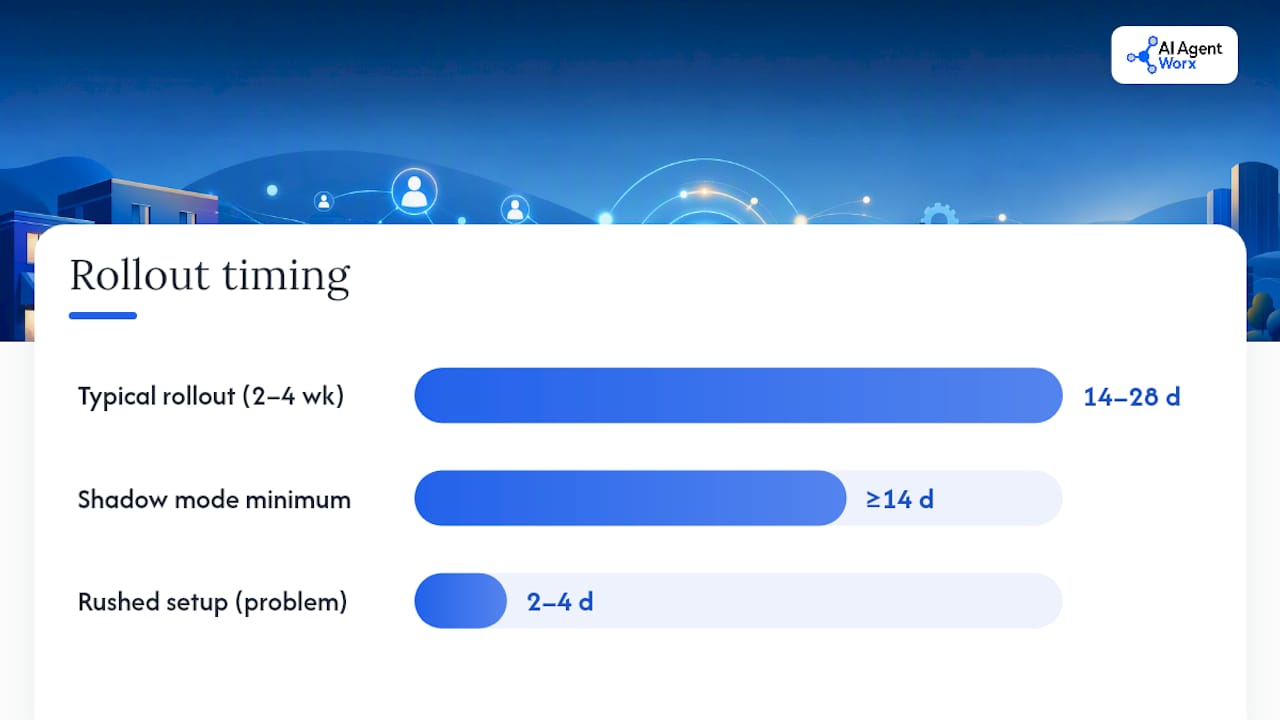
Deploying this well takes about two to four weeks for most SMBs, not two to four days. Rushing the setup is the single biggest reason systems underperform.
- Decide on your phone number strategy. Keep your existing business number and route it through the new system, or provision a new line for testing before switching over. Keeping your existing number, as RingCentral points out, avoids the friction of updating every listing, sign, and business card you've ever printed.
- Build your knowledge base and map intents to actions. List every reason someone calls your business, then decide what the AI should do for each one: book, quote, transfer, or take a message.
- Connect your CRM and calendar. This is the integration that turns a call into a booked appointment or a logged lead automatically, instead of a note someone has to act on manually.
- Run end-to-end tests with real scenarios. Test the messy calls, not just the clean ones. Background noise, callers who talk over the AI, and people asking about services you don't offer.
- Launch in shadow mode first. Let the AI listen and draft responses while a human still answers live, so you catch gaps before customers hit them.
- Define your handoff and escalation rules explicitly. Decide, in writing, which call types always go to a human, and where they go when they do.
- Set your privacy and consent language. Callers should know they're speaking with an automated system, and any recorded data needs to follow your state's call recording and privacy rules.
- Monitor resolution rate, transfer rate, and CSAT weekly for the first month. Twilio's adoption research emphasizes that businesses succeed by prioritizing interoperability and strong handoff design rather than treating the AI as a total replacement for a human team.
Pro Tip: Run shadow mode for at least two full weeks, not two days. Call volume patterns shift by day of week, and you want to see how the system handles a slow Tuesday and a chaotic Monday before it's live and unsupervised.
If you're weighing broader integration costs alongside this rollout, a resource like Cost Beacon can help you evaluate the cloud infrastructure and security trade offs of connecting a new voice AI system to your existing tools.
Which Businesses See the Biggest Return?
Not every business benefits equally from automated call answering, and knowing where you sit on this list tells you how fast the payback happens.
- Appointment-driven businesses like medical practices, salons, and professional services see the fastest returns. Every missed call is a missed booking, and a system that books directly into your calendar converts callers the moment they hang up.
- Home service businesses, plumbers, electricians, HVAC companies, capture the highest-value leads through automation because emergency calls happen at 9 PM on a Saturday, and whoever answers first usually wins the job.
- Retail and multi-location businesses get consistency. Every location answers the same way, handles overflow during busy periods the same way, and no single front desk becomes a bottleneck.
- Sales-driven businesses use automated call answering to qualify leads immediately: capturing budget, timeline, and intent before a human ever gets on the phone, so the sales team only spends time on calls worth having.
Vendor-reported estimates suggest AI receptionists handle roughly 70 to 80% of routine calls without human involvement, freeing staff to focus on the complex conversations that actually need a person. That figure varies by industry and setup quality, but it gives you a realistic benchmark rather than a marketing promise.
How Do You Choose the Right Vendor or Consultant?
Most demos are designed to make the AI look impressive on easy calls. Your job is to make them prove it on hard ones.
Start with these evaluation criteria before you sign anything:
- NLU accuracy on your actual vocabulary. Feed the vendor real call transcripts or common phrases from your industry and ask them to run a live test, not a canned demo script.
- Integration depth, not just integration existence. "We integrate with your CRM" can mean a real two-way sync or a once-daily data dump. Ask which.
- Action execution range. Can it book, reschedule, and cancel appointments, or only book new ones?
- Scalability under concurrent load. Ask directly: what happens when 12 calls come in at the same time?
- Privacy and data handling. Where is call data stored, how long is it retained, and does it comply with your state's recording consent laws?
- Support responsiveness. When something breaks at 8 AM on a Monday, who do you call, and how fast do they respond?
For a trial period, request specific numbers, not vague reassurance. Ask for the resolution rate and transfer rate on a comparable business's rollout. A useful, honest trial target: aim for a resolution rate improving week over week as the knowledge base gets refined, with the 71% consumer willingness figure as your reminder that most callers will give the system a fair shot if it actually solves their problem.
A short trial succeeds when you see a measurable lift in captured leads compared to your missed-call baseline, and when your team reports fewer interruptions for routine questions. If a vendor won't commit to sharing performance data during a trial, that's a signal worth taking seriously.
How AI Agent Worx Builds This for Small Businesses
AI phone receptionists are typically built as part of a broader done-for-you automation system, focusing on hands-on implementation instead of advice alone. That distinction matters more than it sounds, because most of the friction in this technology comes from setup, not the AI itself.
The build process follows a straightforward path:
- Discovery: understanding your call patterns, common questions, and where calls currently get missed or mishandled.
- Build: configuring the AI Phone Receptionist with your knowledge base, booking rules, and escalation paths.
- Integrate: connecting your calendar and CRM so bookings and leads flow automatically instead of sitting in a call log.
- Stage and test: running the system in shadow or limited mode before it takes live calls unsupervised.
- Go-live and support: launching fully, then monitoring performance and adjusting the knowledge base as your business changes.
Because the build ties directly into appointment scheduling and follow-up rather than sitting as a standalone tool, bookings made on a call show up in your calendar and your CRM without anyone re-entering data by hand. That's the practical difference between a phone gadget and an actual operations system.
The Biggest Mistake I See Owners Make
Owners rush this. They skip real testing, train the knowledge base with generic FAQs instead of their actual call patterns, and never define a clear handoff policy until an angry customer exposes the gap. All three mistakes are avoidable, and all three come from treating setup as an afterthought instead of the actual work.
If you take one thing from this guide, run a short live trial with real calls, not scripted demo calls, and measure resolution rate and lead capture before and after. That single test tells you more than any sales deck ever will. The technology is ready for most SMBs. The rollout discipline is what determines whether it actually pays off.
— Brian
Ready for an AI Phone Receptionist That Actually Books the Appointment?
Most call answering options fall into two buckets: a generic software subscription you configure yourself, or an answering service where a human reads scripts off a screen. AI Agent Worx is neither. It's a done-for-you build where the AI is trained on your business, connected to your calendar and CRM, and tested before it ever touches a live call, so you're not stuck troubleshooting a chatbot at 10 PM.

The company handles the full setup: knowledge base, booking logic, escalation rules, and integration, without asking you to become a part-time AI administrator on top of running your business. A discovery call is where this starts. You walk through your current call volume and missed-call pain points, and AI Agent Worx maps out what a working system looks like for your specific setup. If phone answering is just one piece of a bigger operational gap, appointment automation and lead follow-up can be built alongside it. Check out the full service catalog or go straight to the AI Phone Receptionist page to book a discovery call and see what a real build looks like for your business.
Sources
The consumer research cited throughout this guide comes from a 2025 PR Newswire consumer study on phone service preferences, Twilio's conversational AI adoption report on rollout trends and interoperability, a peer-reviewed field experiment on voice AI's real-world impact on complaints and abandonment, and vendor technical explainers from RingCentral and Salesforce on system architecture and typical SMB features.
- Hear Me Out: Consumer Study Reveals Phone Still Reigns in Customer Service
- Twilio’s Latest Report Highlights Conversational AI’s Rapid Adoption, Challenges, and Perception Gaps
- Voice-based AI in call center customer service: A natural field experiment
- AI Receptionist for Small Business: Answer Calls Without Hiring
- What Is an AI Receptionist? Benefits & How It Works | Salesforce
FAQ
How Do I Turn On Automatic Phone Answering?
Most automated call answering systems activate by routing your existing business number through the provider's platform, a change usually made with your phone carrier or VoIP provider. With a done-for-you build like AI Agent Worx's AI Phone Receptionist, this routing is configured during setup, so you're not making carrier changes yourself.
How Much Does an AI Call Answering Service Cost?
Pricing varies by provider and typically follows per-minute, flat monthly, or per-seat models, with setup fees for knowledge base training and integrations. AI Agent Worx builds are customized per business, so pricing is discussed during a discovery call rather than published as a flat rate.
Is There an App That Automatically Answers Calls?
Yes, several consumer apps and business platforms offer basic auto-answer features, but most only handle simple call screening rather than booking appointments or capturing leads. A full automated phone attendant designed for business use, like an AI receptionist, goes further by taking real actions such as scheduling and CRM updates.
How Do I Turn Off Automatic Call Answering?
You can disable automated call answering through your provider's dashboard or by adjusting call routing settings with your carrier, which typically reverts calls to ringing through to a live line or voicemail. Most business-grade systems let you toggle this per line or schedule specific hours when the automation is active.