
If your business gets routine, bookable calls (appointments, quotes, basic questions), an AI phone receptionist is worth deploying now, and A done-for-you build is often the lowest-risk way to get there for most owners. The exception: businesses juggling emotional, high-stakes, or judgment-heavy calls (crisis lines, complex legal intake) need a human-first setup with AI in a supporting role. Either way, skip the DIY SaaS trial-and-error and get a compliance-aware implementation from day one.
TL;DR:
- Proper setup requires analyzing call logs, configuring clear escalation and escape procedures, and listening to live calls to fine-tune the system for optimal performance.
- Small businesses with routine, booking-focused calls benefit most, while high-stakes, high-trust calls need hybrid models with human oversight.
- Plans range from $99 to $300 monthly for ready-made solutions, with custom builds costing several thousand dollars upfront to tailor screening and compliance needs.
- Success depends on transparency, ongoing monitoring, and dedicated ownership of escalation metrics, not just installing the software and hoping it works.
Table of Contents
- What Does an AI Phone Receptionist Actually Do?
- What Are the Real Benefits and Risks of AI Reception?
- What Does an AI Receptionist Cost, and What's the Payback?
- How Do You Roll Out an AI Receptionist Without Breaking Things?
- What Compliance Rules Apply to AI Phone Receptionists?
- How AI Agent Worx Builds Phone Receptionists the Right Way
- What Owners Get Wrong About AI Reception
- Get Your AI Phone Receptionist Built and Live in Weeks
- Sources
- FAQ
What Does an AI Phone Receptionist Actually Do?
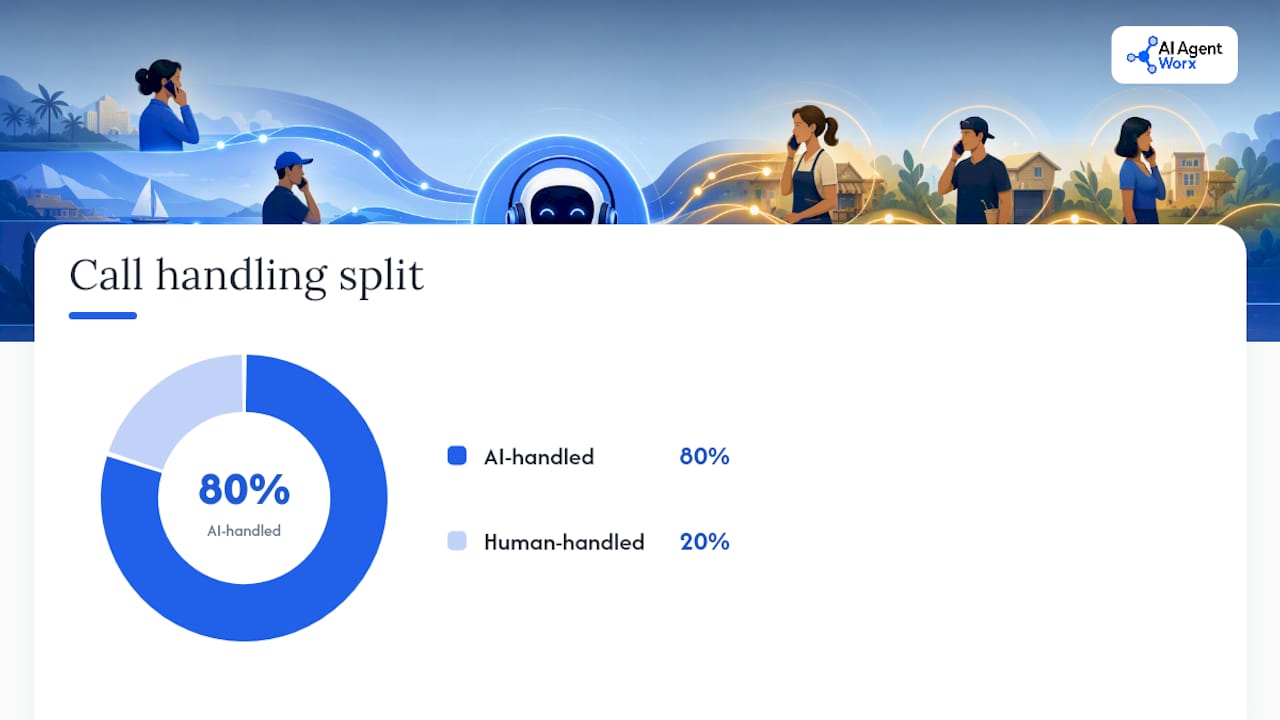
An AI phone receptionist picks up your business line, talks to the caller like a person would, and handles the stuff your front desk does 80% of the day, according to this source. That's the plain version. Under the hood, it's speech recognition plus a conversation engine plus your booking software, all wired together so nobody notices the seams.
Here's what it actually handles on a normal day:
- Answering and greeting every call, no hold music, no "please stay on the line"
- Qualifying the caller (new patient or existing? emergency or routine? what service?)
- Booking appointments straight into your calendar
- Routing urgent or complicated calls to a real person
- Capturing messages with structured details instead of a scribbled sticky note
- Summarizing the call into a transcript your team can scan in ten seconds
The integrations matter as much as the AI itself. A decent setup connects to Google or Office calendars, scheduling tools, your CRM, and SMS, so a booked call turns into a confirmation text without anyone lifting a finger. AI Agent Worx builds these connections directly into its phone receptionist setups rather than bolting on a generic script.
Where AI still falls short: anything emotional, high-trust, or requiring judgment. A grieving family calling a funeral home, a patient describing symptoms that sound serious, a customer threatening to cancel a contract. These calls need a person, fast. A layered approach with AI up front and warm human transfer for anything sensitive produces the best outcomes, according to industry analysis on AI voice deployment.
Dental and medical offices, home services, salons, and law firms handling routine intake tend to be strong AI-first candidates. Businesses running crisis response, high-value B2B sales, or anything requiring real empathy in the first ten seconds should run hybrid, with AI as the first filter and a person close behind it.
What Are the Real Benefits and Risks of AI Reception?
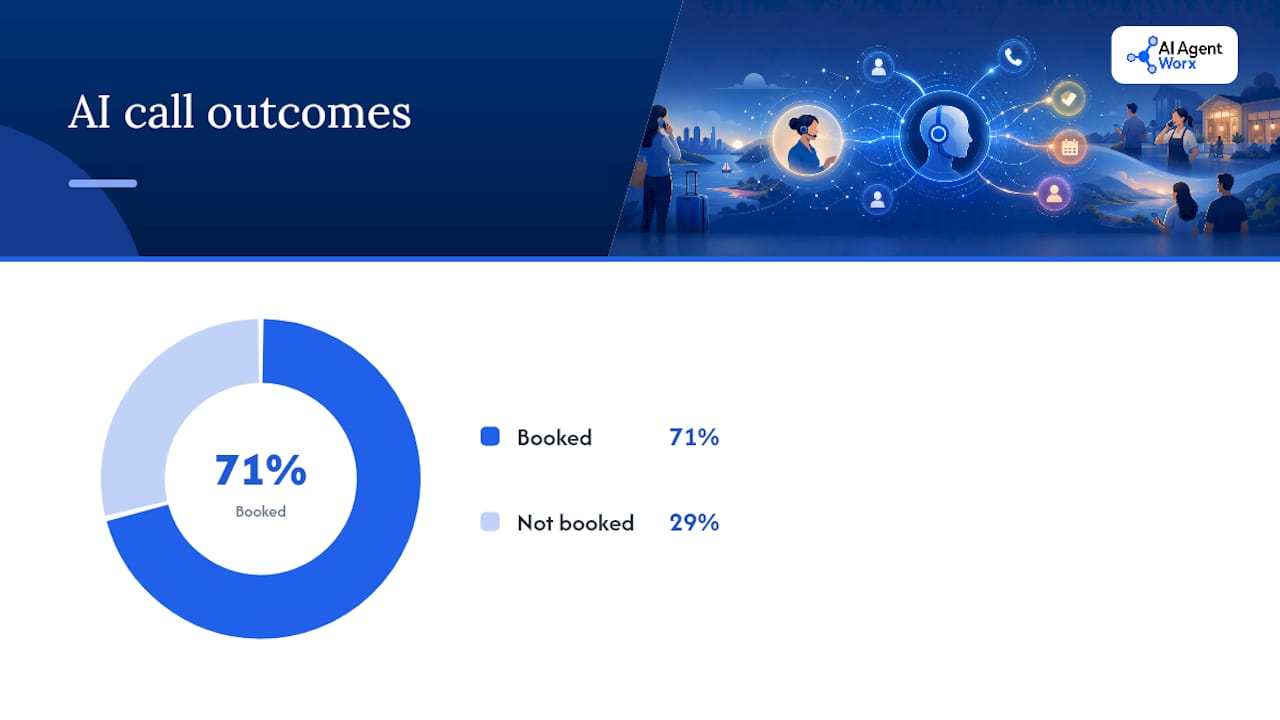
The upside is measurable, and it's bigger than most owners expect. A three-month real-world test on a small business converted 43 of 61 previously missed calls into confirmed bookings, running around £199 a month. That's not a vendor's marketing number. That's what happened when a real business let AI pick up calls it used to lose entirely.
The Numbers: 43 booked jobs out of 61 calls the business would have otherwise missed, for a monthly bill under £200, according to the Lilach Bullock field test.
The 24/7 pickup is the real driver. Calls that used to hit voicemail at 7 p.m. on a Saturday now get answered, qualified, and booked before you're even awake. That's revenue that used to walk straight to a competitor.
But the risks are just as real, and they're operational, not theoretical. Industry commentary on AI receptionist risk flags three recurring failure patterns: hang-ups from callers who feel stuck in a script, callers trapped in a loop with no way to reach a human, and vulnerable callers (elderly, non native speakers, people in genuine distress) losing access entirely when automation is the only gatekeeper.
The fixes aren't complicated, but they have to be built in from the start, not patched on after a complaint:
- Disclose the AI upfront. A transparent opening line reduced hang-ups in field testing and filtered out uninterested callers fast, per the same field test.
- Give every caller an escape phrase. Something like "talk to a person" should trigger an immediate transfer, no exceptions.
- Build urgent-keyword transfer rules. Words like "emergency," "hurt," or "urgent" should route straight to a human line, every time.
Pro Tip: Set your urgent-keyword list before launch, not after your first bad call. Ask your team what words actually come up on emergency calls, then build the transfer rule around real language, not guesses.
Once it's live, track three numbers weekly: completed resolutions (calls the AI handled start to finish), escalation rate (how often it hands off to a person), and abandoned calls (callers who hung up frustrated). If abandoned calls climb, your script needs tuning, not more automation.
What Does an AI Receptionist Cost, and What's the Payback?
Pricing splits into three rough bands, and the difference usually comes down to how much conversation design and customization you're paying for.
Budget SaaS plans run cheapest but come with rigid scripts and limited integrations. Mid-range plans, commonly priced between $99 and $300 a month, add calendar syncing, basic CRM connections, and more natural conversation flow. Premium or custom builds cost more upfront (often $3,000 to $12,000 one-time, plus ongoing monthly fees for the model and monitoring) but get tuned specifically to your call patterns, your scripts, and your compliance needs.
Most providers use one of two pricing models:
- Flat fee plus overage. A base monthly rate covers a set number of minutes or calls, with per-minute or per-call charges above that.
- Per-interaction pricing. You pay per completed call or booking, which scales cleanly with volume but can get expensive fast for high-call businesses.
Here's a payback worksheet you can run in five minutes. You need four numbers: monthly call volume, your current miss rate (what percentage go to voicemail or ring out), your close rate on booked calls, and your average ticket size.
That's 24 potential bookings sitting in missed calls every month, worth $3,600. Even at a conservative recovery rate, an AI receptionist paying $250 a month pays for itself many times over just from calls you're currently losing outright. Nextiva's ROI modeling shows payback windows of 30 to 90 days are common across SMB scenarios once you factor in recovered bookings and reduced no-shows from automated confirmations.
If your call volume is low and your calls are simple, trial a SaaS plan first. If you're regulated, have complex intake, or your average ticket is high enough that a bad first impression costs real money, skip the trial phase and go straight to a done-for-you build tuned to your business from day one.
How Do You Roll Out an AI Receptionist Without Breaking Things?
Deploying this right takes structure, not luck. Here's the sequence that actually works, based on how real implementations get built and tuned.
-
Pull your call logs first. Before you touch any software, look at three months of call history. What are people actually calling about? Rank the top intents (booking, rescheduling, pricing questions, emergencies) and write down the five most common caller questions word for word. This becomes your script foundation.
-
Configure the pilot with disclosure built in. The greeting states clearly that the caller is speaking with an AI assistant. Connect the calendar and CRM before the first live call, not after. Set your emergency transfer keywords now, based on real language from your call logs.
-
Run scripted test calls internally. Have three or four team members call in and try to break it, ask weird questions, get frustrated on purpose, use an accent your AI hasn't heard yet. Fix what breaks before a real customer finds it.
-
Listen to the first 50 to 100 live calls. This is the step most businesses skip, and it's the one that matters most. A practical pilot typically completes setup in an afternoon, but the real work happens in the tuning week that follows, listening to actual calls and adjusting language, transfer rules, and what the AI is and isn't allowed to promise.
-
Assign a human owner for escalations. Someone on your team needs to own the escalation queue, log complaints, and review call summaries weekly. This isn't a "set it and forget it" system, and treating it that way is how small problems become bad reviews.
Pro Tip: When a call gets warm transferred to a human, that person needs the caller's name, number, the caller's own words describing the problem, and the AI's transcript, handed over instantly. Making a caller repeat themselves after they were just told "let me connect you" undoes half the goodwill the AI just built.
The heaviest lift isn't the technical setup. It's conversation design, deciding exactly what your AI receptionist should say, what it should never promise, and where the line sits between "handle this" and "get a human." Businesses that treat this as a one-afternoon software install instead of a tuned system tend to see the hang-up and complaint patterns that give AI reception a bad name.
What Compliance Rules Apply to AI Phone Receptionists?
If your business touches protected health information, payment data, or legal intake, your AI receptionist setup has requirements that a generic SaaS plan usually can't meet out of the box.
Start by identifying your regulated touchpoints. Does the AI ever hear or store protected health information (symptoms, diagnoses, treatment details)? Does it ever capture a credit card number over the phone? Does it take intake information that could count as privileged communication for a law firm? Any yes here changes what you need from a vendor.
For dental and medical practices specifically, a HIPAA-compliant approach to AI-powered communications requires specific safeguards before any patient data touches the system. The minimum checklist looks like this:
- A signed Business Associate Agreement (BAA) with your AI vendor
- Encrypted storage for any call transcripts or recordings containing PHI
- Consent notes logged when the AI collects any regulated information
- Audit logs showing who accessed what data and when
Most off-the-shelf SaaS platforms aren't HIPAA or PCI compliant by default. That's not a knock on the technology, it's just not built for regulated data out of the gate. Regulated businesses generally have three paths: a vendor's dedicated compliance tier (often at a premium price), a capture-only setup that takes basic information and routes everything sensitive to a human immediately, or a custom build with compliance designed in from the first line of code rather than added after the fact.
If you're a dental practice, medical clinic, or law office evaluating a virtual AI receptionist, ask about the BAA and encryption before you ask about price. The cheapest plan that can't sign a BAA isn't actually the cheapest option once you factor in the risk.
How AI Agent Worx Builds Phone Receptionists the Right Way
Most of the failure patterns covered above come down to one thing: treating AI reception like a plug-and-play product instead of a system that needs to be built around your specific calls. Some providers approach it the opposite way.
Every build starts with your actual call logs and workflows, not a generic template. That means the greeting, the qualifying questions, and the transfer rules all get written around what your callers actually ask, not what a script writer assumed they'd ask. Integrations with your calendar, CRM, and messaging tools get built in during setup, not left for you to configure yourself after the fact.
Escalation rules get set before launch, not discovered after a bad call. That means emergency keywords, human escape phrases, and warm-transfer handoffs (caller name, number, and context passed along, no repeating yourself) are part of the initial build. During onboarding, calls get tested and tuned using the same listen-to-the-first-calls discipline that separates a smooth deployment from a frustrating one. For regulated businesses, compliance requirements (encrypted storage, consent logging, audit trails) get built into the architecture rather than patched on when a client asks.
The result is a system that's live faster than most self-serve platforms, but tuned more carefully than a script you configured yourself on a Tuesday afternoon.
What Owners Get Wrong About AI Reception
Most of the debate around AI phone receptionists gets framed as all-or-nothing: either you trust the robot completely or you keep a human glued to the phone forever. That framing is backwards. The businesses getting real value are running hybrid models, AI catching the routine 80%, humans owning the emotional or complicated 20%, and that split is the whole point, not a compromise.
Three lessons show up again and again in real deployments. First, disclose the AI upfront, every time. Hiding it doesn't build trust, it destroys it the moment a caller figures it out. Second, the first week of live calls matters more than the entire setup process combined. That's when you find the weird phrasing, the accent it misreads, the question nobody scripted for. Third, someone specific has to own escalation metrics weekly, not "the team," a named person checking abandoned-call rates and complaint logs every week without fail.
A dental office that rolled this out well didn't succeed because the AI was flawless. It succeeded because someone reviewed the first fifty calls line by line and fixed what was awkward before a patient ever noticed.
— Brian
Get Your AI Phone Receptionist Built and Live in Weeks
Aiagentworx replaces the trial-and-error of DIY SaaS platforms with a system built around your actual calls, not a generic script you have to configure yourself. Instead of guessing at pricing tiers and hoping the integrations work, you get a done-for-you build with your calendar, CRM, and escalation rules set up correctly from the first live call.

The phone receptionist service starts with a discovery call where the team reviews your current call patterns, identifies your top caller intents, and scopes out integrations with your existing calendar and appointment scheduling workflow. From there, expect a pilot phase built around your real call logs, followed by a tuning week where the team listens to live calls and adjusts language and transfer rules before you're relying on it fully. Pricing depends on call volume and complexity, and the full services overview breaks down what's included at each tier. If you're ready to stop losing calls to voicemail, book a discovery call and get a straight answer on what a custom build looks like for your business.
Sources
The Lilach Bullock field test documents a real 90-day deployment with actual booking numbers and monthly costs, useful for grounding ROI expectations. Business2Community's risk analysis covers the access and fallback failures that make human escalation rules non-negotiable. CallForce's 2026 industry overview explains why layered handoff design matters more than raw AI accuracy. Nextiva's ROI breakdown offers sector-specific payback modeling for businesses running the numbers themselves.
- AI Receptionist Risks for Small Businesses - Business2Community
- AI Voice Agents for Small Business: What Works in 2026 | CFG
FAQ
How Much Does an AI Receptionist Cost?
Mid-range plans typically run $99 to $300 a month, while custom builds cost $3,000 to $12,000 upfront plus ongoing monthly fees. Pricing depends on call volume, integrations needed, and whether compliance features like HIPAA support are required.
How Do You Build an AI Phone Receptionist?
Start by pulling your call logs to identify your top caller intents, then configure a pilot with calendar and CRM integrations, AI disclosure in the greeting, and emergency transfer keywords. A done-for-you provider like AI Agent Worx handles the technical setup and conversation design, while a self-serve SaaS route requires you to script and test it yourself.
Is There a Free AI Receptionist Service Available?
Most providers offer limited free trials rather than permanent free tiers, since running a live conversational AI on real phone lines carries ongoing infrastructure costs. Test any trial against real call scenarios, including urgent requests and accents, before committing to a paid plan.
What Does an AI Receptionist Do?
It answers calls, qualifies callers, books appointments directly into your calendar, routes urgent calls to a human, and captures structured messages with a transcript. It handles routine, bookable calls well but should hand off anything emotional or high-stakes to a person.